Read the revealed clues, rule out contradictions, and confirm each suspect with evidence. Guide and Help open in a new tab.
Netherguard: Hero Hunt
Preparing the playable web game inside WordPress…
Netherguard is a compact deduction game for short browser sessions. Use confirmed clues, inspect suspect cards, and avoid unsupported guesses before naming the hidden hero.
Controls: pointer-based browser input. If the game does not load, refresh once and report the page URL, browser, device, and whether this loading card appeared.
Designed, written, and tested by Diligesker Lab · Player guidance updated September 15, 2026 · Report a gameplay or documentation mismatch
How to play this Netherguard browser build
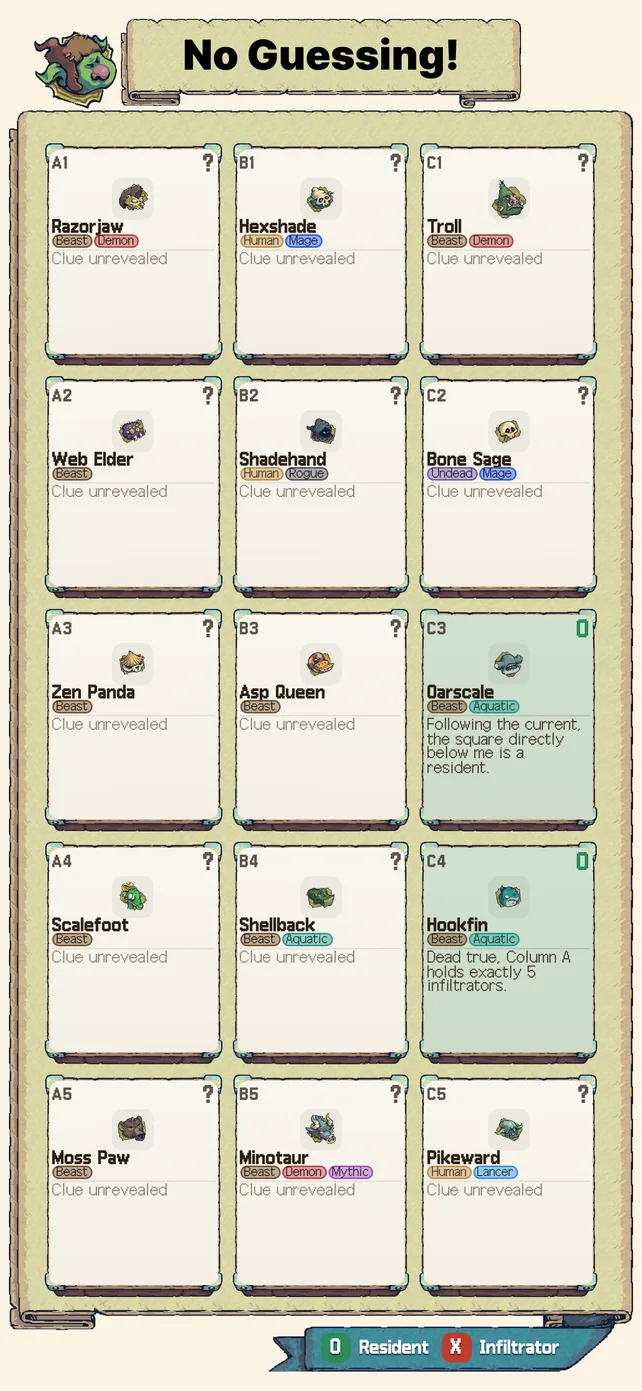
Netherguard: Hero Hunt is a logic-deduction game, not a hidden-object search or a reflex challenge. A case presents demon residents, one or more heroes in disguise, and statements about identity, position, traits, or relationships that are revealed as suspects are confirmed. Your task is to combine those statements until an accusation is supported. The useful habit is to ask which candidates are impossible before asking which portrait merely looks suspicious.
A reliable first investigation
- Read the revealed clues before confirming anyone. Start with the already confirmed resident. Confirming a supported card reveals its statement, so use only the clues currently available on the board.
- Mark contradictions. If a suspect conflicts with a confirmed trait or position, remove that candidate from consideration. Do not replace evidence with repeated taps.
- Cross-check counts. A group count must still work after a direct clue rules a card in or out. If your tentative answer makes the total impossible, revisit the earlier assumption.
- Accuse only when the remaining clues agree. The intended solution is supported by a chain of evidence. The game is built so a lucky guess is unnecessary.
Controls, language, and progress
| Area | What to expect |
|---|---|
| Input | Use the on-screen controls with a mouse, trackpad, or touch. The game does not require keyboard shortcuts. |
| Language | The current game interface supports English and Korean. The WordPress wrapper selects English on a first visit; the in-game language choice can be changed later. |
| Progress | Campaign progress, tutorial state, and preferences can be kept in this browser’s local storage. Clearing site data or using a private session may reset that local state. |
| Account | No Diligesker account or sign-in is required to start the public browser build. |
| Session comfort | Portrait orientation gives the clearest layout on a phone. Browser chrome and very short viewports can reduce the visible play area. |
Keep your game open while reading
The Guide link above opens a separate tab so you can compare a clue or shot decision with the board. Return to this tab to continue. Do not refresh an unfinished attempt just to open a guide. Browser-local progress is not a cloud backup.
If the game does not start
Refresh once and keep the loading card visible long enough to note its final message. If the menu still does not appear, send the contact page the play URL, browser and version, device, orientation, whether the loading card appeared, and the last visible stage. You can still read the rules and current screenshots, follow the beginner clue method, or work through the Reedshadow Passage case without running the game.
Scope of this public build
This is a maintained browser edition of an experimental game. Screenshots and written rules describe the build checked on the review date above; balance, touch comfort, story presentation, and platform-specific features can change. The public change log records visitor-visible revisions. If a rule on this page no longer matches the shipped build, the correction route is part of the product—not an afterthought.