Rank Math Sitemap Not Updating After REST API Edits: Cause and Safe Fix
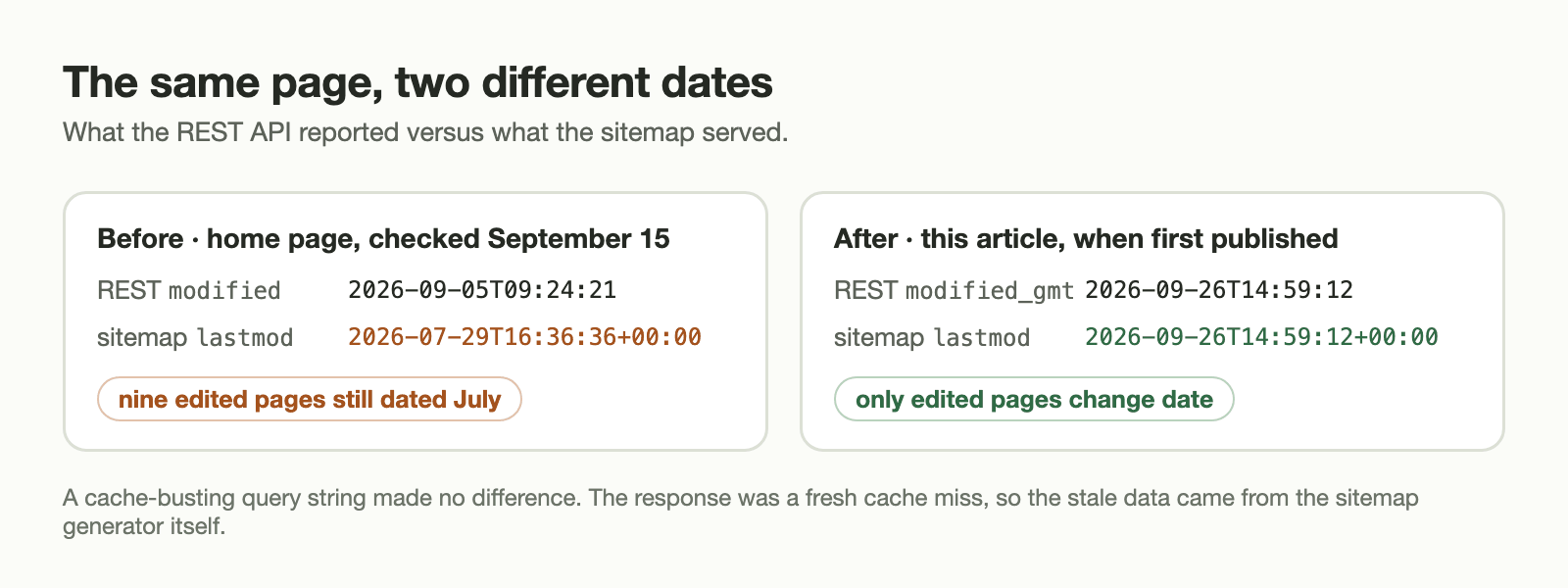
This site is edited almost entirely through the WordPress REST API. On September 5, 2026 nine pages were updated that way. Ten days later the Rank Math sitemap still showed their July dates. This note covers how the problem was confirmed, where the cause is in Rank Math’s source, and a workaround that doesn’t touch the plugin or fake any dates.
Verified against Rank Math SEO 1.0.278, the version installed when the problem was found, and 1.0.279, the current one. Both contain the same code. If you run a later version, check the two lines quoted below before you copy the workaround.
The symptom
- The REST API reported the home page’s
modifiedtime as2026-09-05T09:24:21. /page-sitemap.xmlstill listed2026-07-29T16:36:36+00:00for the same URL. The sitemap index carried the same July date.- All nine pages changed on September 5 had stale
lastmodvalues. - A cache-busting query string made no difference, and the response was a fresh cache miss. This was not the browser cache or the CDN. The sitemap generator itself was returning old data.
Search engines are not obliged to use lastmod. Google’s sitemap documentation, however, says it uses the value when it is consistently and verifiably accurate. A sitemap that ignores real edits is worse than having no date at all.
The cause, in Rank Math’s source
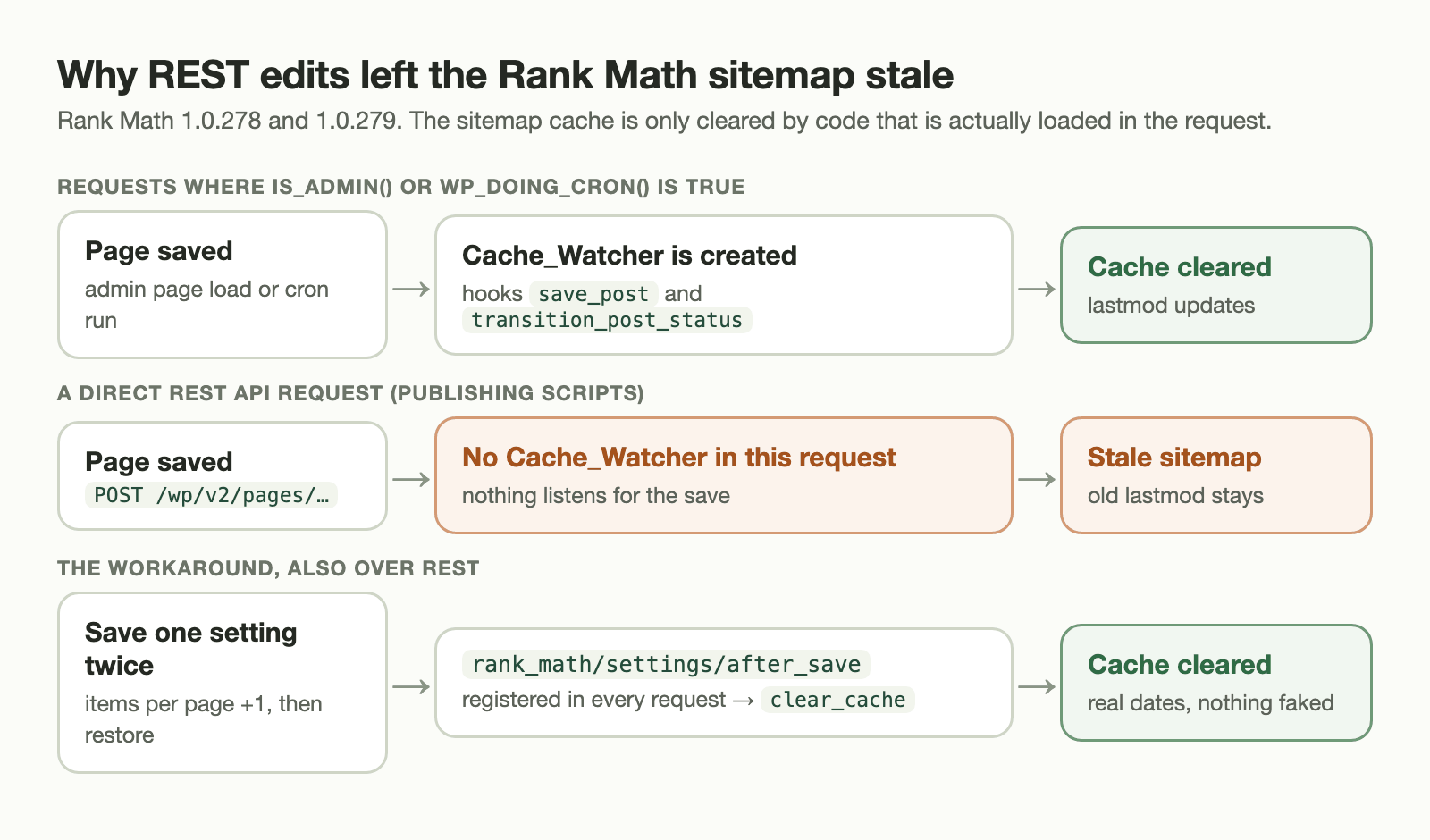
Rank Math caches generated sitemaps. A class called Cache_Watcher clears that cache when content changes. It hooks save_post, transition_post_status, term edits and author changes. But the sitemap module only creates the watcher in two contexts:
// includes/modules/sitemap/class-sitemap.php
if ( is_admin() || wp_doing_cron() ) {
    new Cache_Watcher();
}
A REST request is neither an admin page load nor a cron run. When a page is saved through /wp-json/wp/v2/pages/…, the watcher does not exist in that request, so nothing clears the sitemap cache. I did not test whether saving from the block editor behaves differently, so this note only covers direct REST clients such as publishing scripts.
A later WP-Cron run doesn’t fix it either. That run creates a watcher, but a watcher is a set of hooks. It reacts to saves made during its own request, not to saves that already happened in an earlier one.
The hook that does run over REST
The same constructor also registers this, with no condition around it:
$this->action( 'rank_math/settings/after_save', 'clear_cache' );Saving any Rank Math setting clears the sitemap cache. Rank Math’s own REST route, /wp-json/rankmath/v1/updateSettings, fires that action. So a native settings save is the one supported way to ask Rank Math to rebuild the sitemap from a REST client.
The workaround
After a publishing batch, the publisher script saves one harmless sitemap setting twice. It changes the “items per page” value by one and then puts it back:
- Export only the sitemap settings and read the current “items per page” value.
- Stop without saving anything if that value is missing or outside the range Rank Math accepts.
- Save that one field as the value plus one, through Rank Math’s own settings endpoint.
- Save the original value back, and confirm each save by reading the returned setting.
A few details matter more than they look:
- Only one field is sent. Other sitemap options are never re-submitted, so a stale copy can’t overwrite them.
- The original value is checked before anything changes. If the export returns something unexpected, the function stops without saving.
- Restoring happens in
finally. If the first save fails or its response is ambiguous, the original value is still written back. - It runs after the post’s status has been saved. A cache-refresh failure can never lose the ID of a post that was just created.
Three tests cover it: a normal refresh, a restore after an uncertain response, and refusal when the setting is invalid.
Alternatives that were rejected
| Option | Why not |
|---|---|
| Re-save every page so they all get today’s date | That makes lastmod inaccurate on purpose, which is the opposite of the goal. |
| Patch the plugin to always register the watcher | The next plugin update removes it silently. |
| Disable sitemap caching | Every sitemap request would rebuild from scratch. It hides the problem instead of fixing it. |
| Open the editor after each REST batch | That is a manual step in a process meant to be automated. |
How the fix was verified
- After a real edit, each changed page’s sitemap timestamp matched its WordPress
modified_gmtvalue. Pages that were not edited kept their old dates. - The check was repeated with a cache-bypassing request.
- The configured page size (200) was the same after the refresh as before.
- Rank Math rewrote some on/off settings to equivalent booleans during its native save. That is a side effect worth knowing about if you diff exported settings.
If you publish to WordPress over REST
- Compare your sitemap’s
lastmodwith the REST API’smodified_gmtfor a page you edited recently. - If they differ, check whether your SEO plugin registers its cache invalidation only for admin or cron requests.
- Prefer an invalidation path the plugin itself supports over faking dates or editing plugin files.