Fablemarch (Work in Progress): How the Village of Amber Gate Is Made
Work in progress. Fablemarch is an early prototype, not a game you can play yet. Everything below can change, including the art direction, the name and the parts that exist only on paper today.
Fablemarch is a fantasy game I started in early October. On October 10 I settled the genre: a pixel-art action game you control directly, built around one hub village you walk through between short, quick runs. Combat, rewards, upgrades and saving don’t exist yet. What does exist, after a month of work, is the village. It’s called Amber Gate, and this note is about how it is made: the plans that now come before any 3D, houses generated from a data file, the rules behind its pixel art with real depth, the villagers, the loading work and the mistakes that shaped it all.
A village with a reason to be there
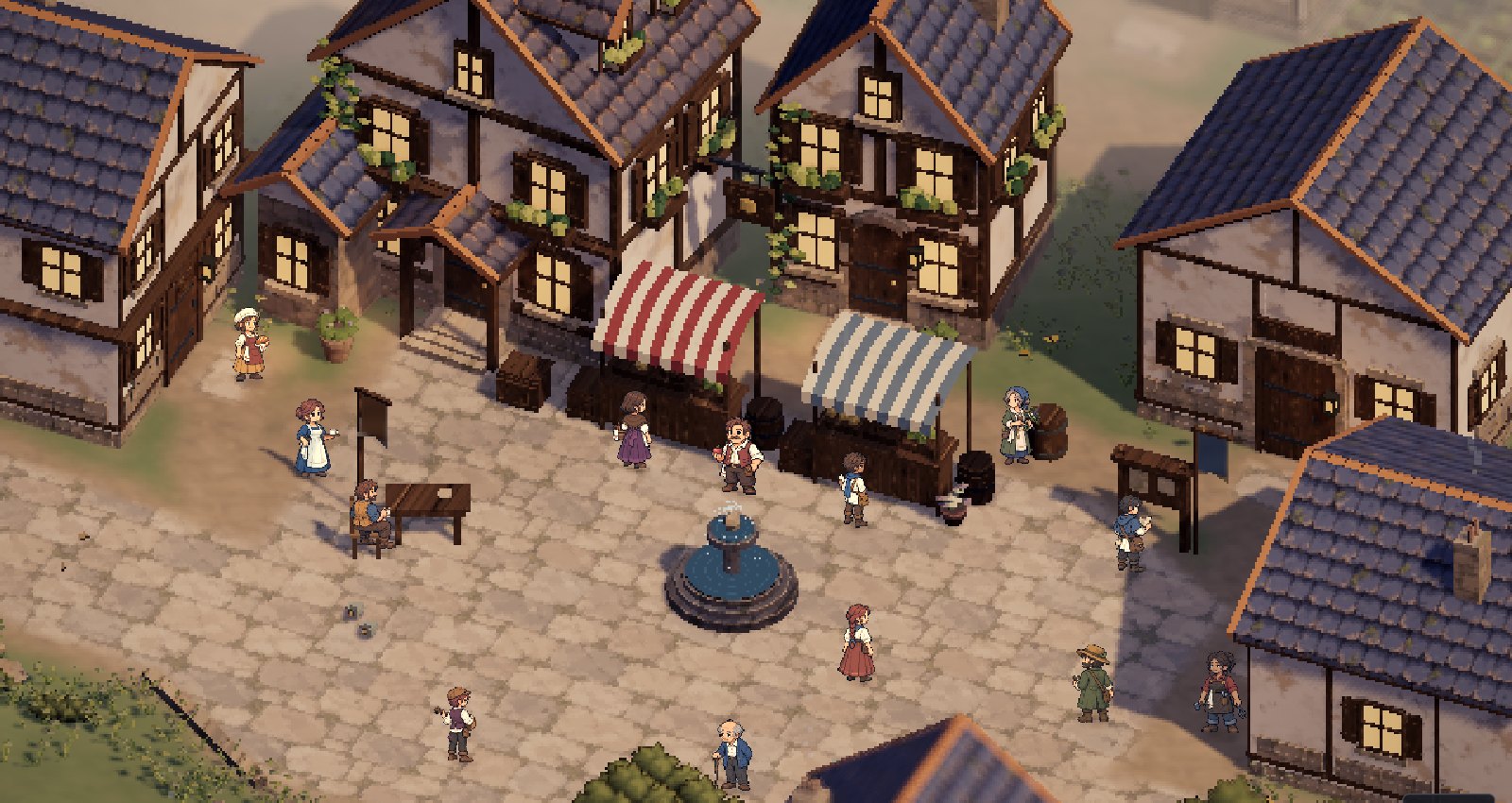
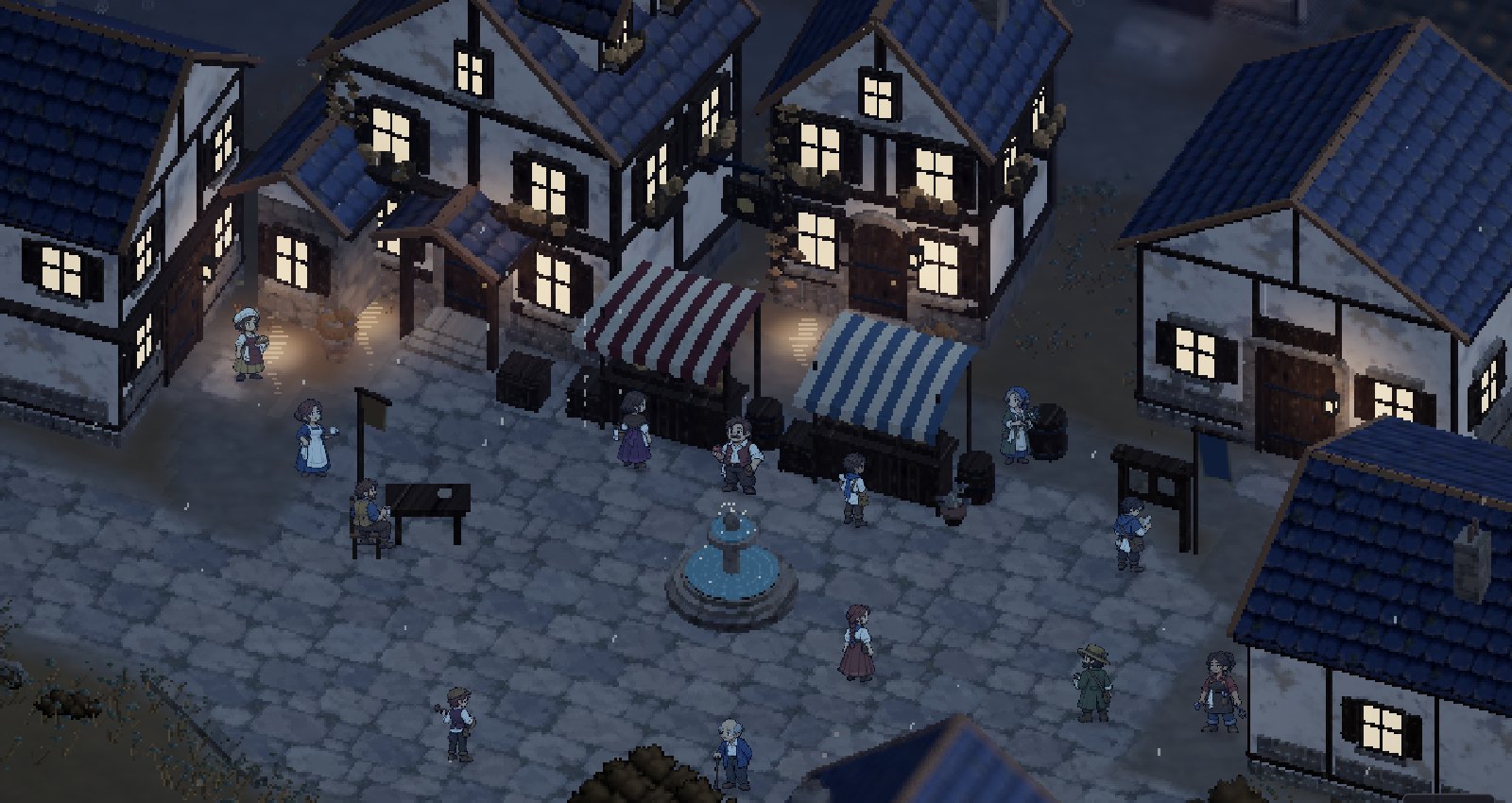
Everything starts from a short written setting. Amber Gate is a small market village on an east–west trade road, grown up around an old well where carters watered their horses. The well is now the fountain in the square. Travellers stop to eat, buy bread, fruit and herbs, read the notices and get a wheel mended. There are sixteen houses, two stalls and the fountain, and no wall, castle or, despite the name, gate. At dusk the sun sets at the west end of the road and the gap between the roofs glows like a red door frame. That is where the name comes from.
The setting gives every house a use, an owner and the shapes that use needs, such as a forge’s open work canopy or a weaver’s drying rack, and an age: the oldest stand on thick, worn stone plinths with heavy timber, later ones have bright plaster and thin, straight timbers. Fourteen villagers each have a place and something they are looking at.
Plans first, then 3D
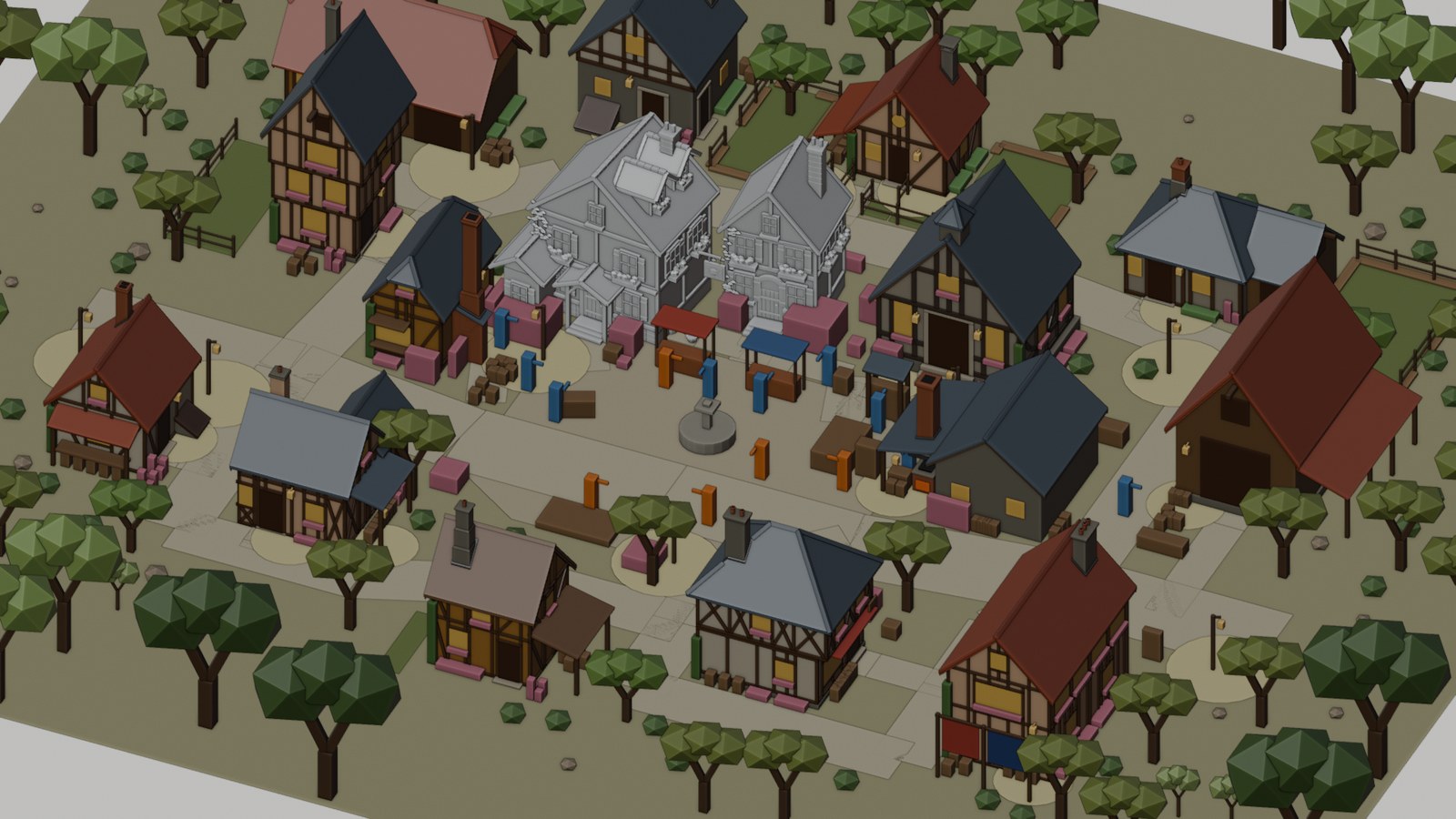
The first square was assembled directly in 3D, and by October 9 it was clear that polishing it would not get there. So I drew the village first: a master plan, a market plan, elevations, a camera sheet and an assembly sheet that separates what gets modelled from what gets painted. A Blender layout guide uses the same coordinates, with stand-in volumes and three fixed cameras at the game’s 960×540 resolution.
A static checker reads the plan before anything is rendered. Its first run found planting spots blocking the path to the bakery and two back alleys, and one tree whose largest allowed canopy touched a real roof edge, so it moved 0.3 units north. After the fixes all 83 checks passed, including one that projects canopies and villagers through every camera so no tree hides a face.
It still wasn’t enough. On October 15, while choosing between target paintings, I found canopies floating in the air, “lollipop” trees on bare poles, thin flower beds and houses that looked too alike. Several had been marked fixed before. Part of the cause was that many placement and shape decisions lived only in code, so a fix on screen never reached anything underneath. I restarted with one rule: four documents are the single source of truth, in order the setting, the structure drawings, the floor plan and the judging criteria. Models, code and runtime data are outputs. If the screen is wrong, the first question is which document has the gap.
The floor plan now has two layers. The authored layer is what I decide by hand: where each villager stands and what they watch, the fourteen trees inside the village and why each is there, the lamps, and the placement rules. The derived layer is generated and never edited: every tree with its trunk and first fork, shrubs, flower boxes, exact prop positions and a list of rule violations. The running game is dumped and compared with it. Every defect anyone points out goes into a recurrence ledger. It started with 41 entries, 8 of which had returned after being marked fixed. Every round re-checks all of them, and a returning defect fails the round. It now holds more than a hundred.
Sixteen houses from one data file
The first full set of houses arrived on October 7 as Blender files: twelve new houses built from five base kits, six of them farmhouses sharing one base mesh, plus four revised originals. In the game they looked too alike. In the restart, every house went into a single structure file and fourteen were redesigned from the setting: masses and storeys, roof type, add-ons, chimney, doors and windows, front steps, materials and surface variants. Positions stay in the floor plan.
A few rules do most of the work. Neighbouring houses must differ in at least two of storeys, plan shape, roof type and eave height. A house’s trade must show on a face the camera, looking from the south-south-east, can see. Anything at least two screen pixels thick, about 0.06 units, is modelled; anything smaller is painted.
The timber framing is procedural. A generator places corner posts, posts beside every opening, then evenly spaced posts; members stop at openings and attachments, and braces go only into free panels at least 0.5 by 0.6 units. Old houses get curved braces and thick, dark timber; later ones get straight, thinner members. Framed houses within 12 units of each other must differ in brace style or in post spacing by at least 0.3 units. Across the village this gives 816 members. When I complained on October 21 that the chimneys were all the same rough box, each of the twelve got its own form, with lead flashing that follows the roof and soot below the outlet.
Each rule lives in one small Python module. Blender 5.1.1 runs headless with them to build the simple 3D, the drawings and reference renders, then reads its own objects back and checks every vertex against the rules to within 0.001 units. The game builds the same houses at load time in TypeScript with three.js from the same file, and its tests compare the framing, roofs, chimneys and door steps with the Python output piece by piece. Only the inn and the herbalist keep the delivered models. Even hidden faces count: 72 framing members can’t be seen from the fixed game cameras and cast no visible shadow, so the normal view doesn’t build them.
What makes it look HD-2D
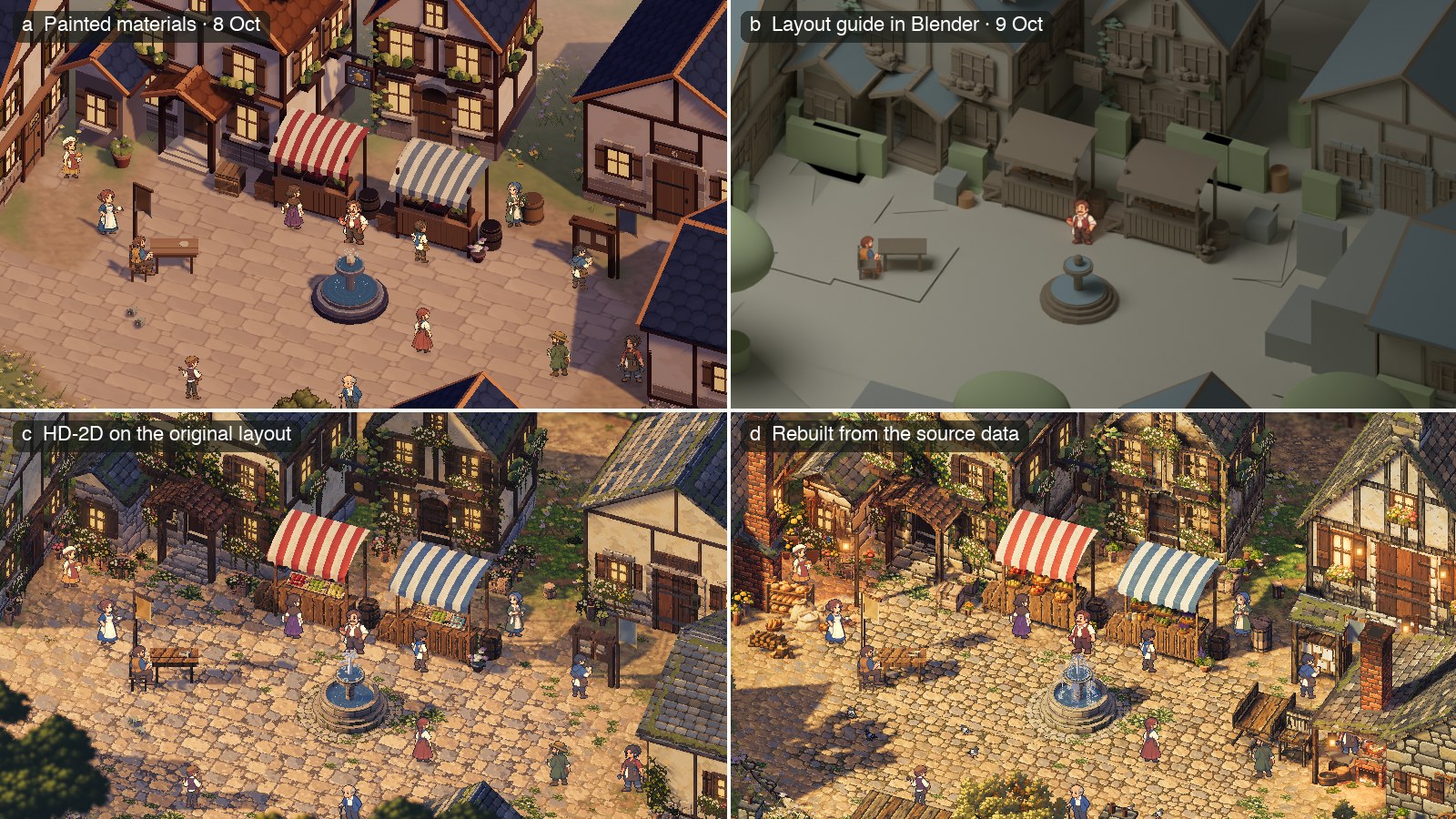
“HD-2D” here means real 3D shapes, pixel-painted surface textures, real light and shadow, and flat pixel-art characters standing among them. I got there by trying the opposite first. On October 8 and 9 I painted the look onto the existing models with illustrated stone, plaster and roof images, painted tree crowns and projected paintings. It looked right from one spot and fell apart elsewhere, because a painting has its perspective and light baked in. Tuning resolution, filters and blur didn’t help: most of the quality in a pixel scene comes from pixels someone drew, the outline of each stone, the highlight on each slate. On October 10 I took the harder route.
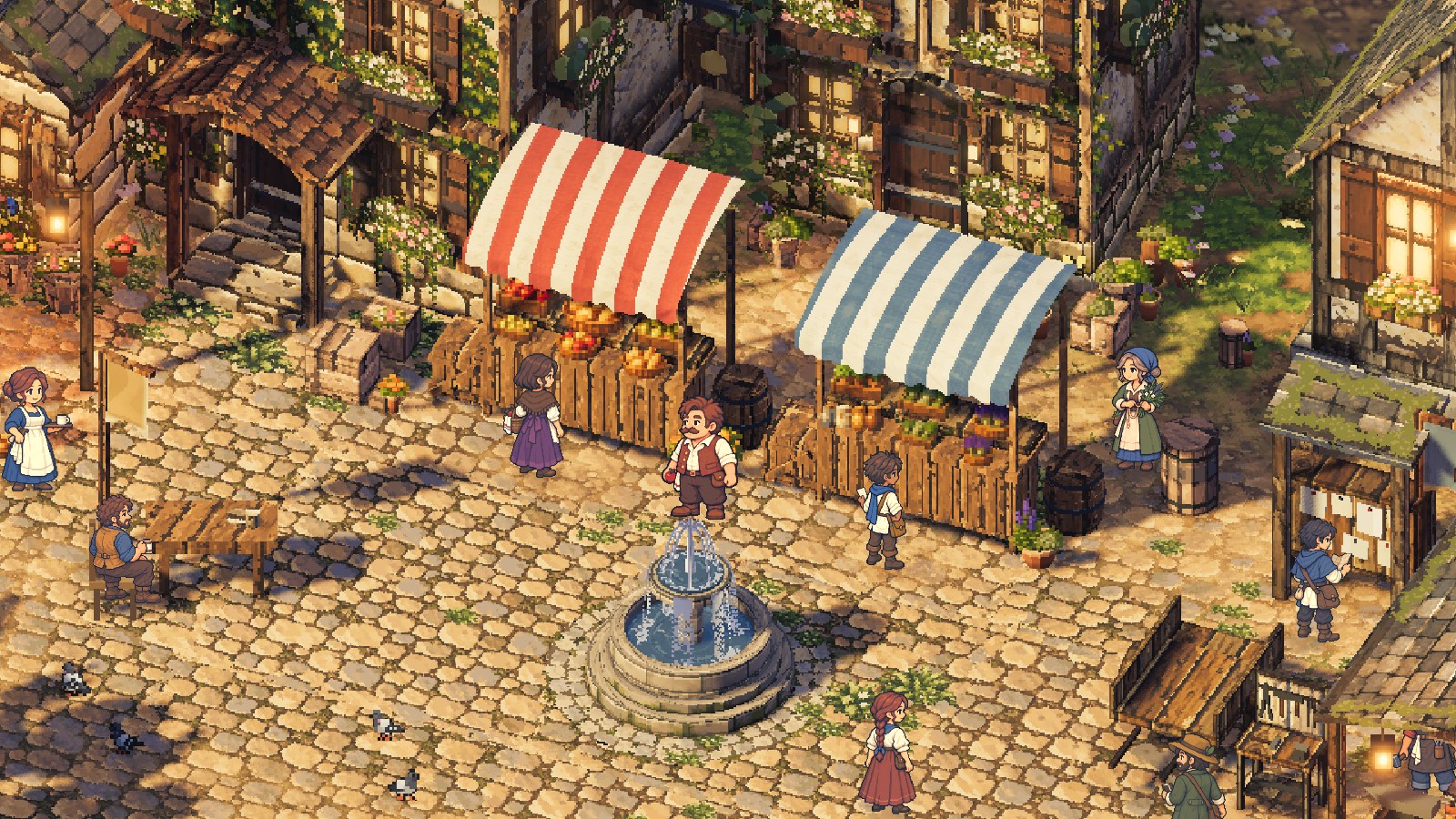
The grid comes first. The camera is orthographic, turned 24° and tilted down 38°, with a view 14.5 units tall. The background renders at 960×540, one-to-one on a 960-wide screen, and a 1.7-unit villager is about 50 pixels tall. Surfaces use 32 texels per unit, close to one texel per screen pixel (64 for ground and walls in the rebuilt village, made for a closer zoomed view). Textures use nearest-neighbour sampling without mipmaps, so mortar lines stay crisp. Each frame the camera snaps to whole background texels and the leftover fraction shifts the finished image, so stones don’t shimmer when it moves.
Textures follow strict rules: 16 to 32 colours per material, four to six brightness steps, warm lights and cool darks, one-pixel highlights and seams, and no black outlines or painted cast shadows. Each texture starts as a generated image with the target painting as a style reference. A script crops it, box-downscales it to the final texel size, reduces it to a shared 32-colour palette, makes the edges tile and removes isolated specks, but never moves or redraws a stone. An earlier route that redrew surfaces procedurally in ten colours failed review. Materials come in variants (four plasters, three timbers, three stones, two slates, three clay tiles) plus weathering and moss, and nearby houses must differ in plaster and in at least two of five surface choices.
The ground is driven by world-space fields instead of painted transitions: distance to the nearest road or yard plus noise, blended over 3.2 units, with brightness and moisture fields that run across mesh boundaries and decide whether grass is fresh green, olive or dry gold. Trees took two attempts. Flat painted tree cards looked lovely on a sheet and wrong in the scene: no ground shadow, drawn from the side for a camera looking down, ignoring the scene’s light. On October 15 I switched to 3D trees with pixel bark and crowns built from painted leaf-clump cards around the branch tips. By October 21 all 85 trees and 62 shrubs in the rebuilt village were 3D.
Light comes last, only after surfaces and shapes are right: one sun, a sky-coloured fill, and window and lamp light at dusk and night. Shadows are a cool blue-violet so materials still read inside them. Bloom touches only things that emit light, a depth-based tilt-shift blur softens only the foreground canopies and the far distance, and the grade warms lights and cools shadows. One choice was pure geometry. The target painting had shadows falling to the lower right and sunlit front walls, and with this camera both can’t be true. I chose sunlit walls, so dusk shadows fall to the right at about 2.2 times an object’s height. That low sun drew self-shadow stripes on the plaster. Raising the shadow normal offset from half a shadow-map texel to two cut my stripe measure from 4.90 to 2.06, where 1.00 means no stripes.
Light, weather and seasons
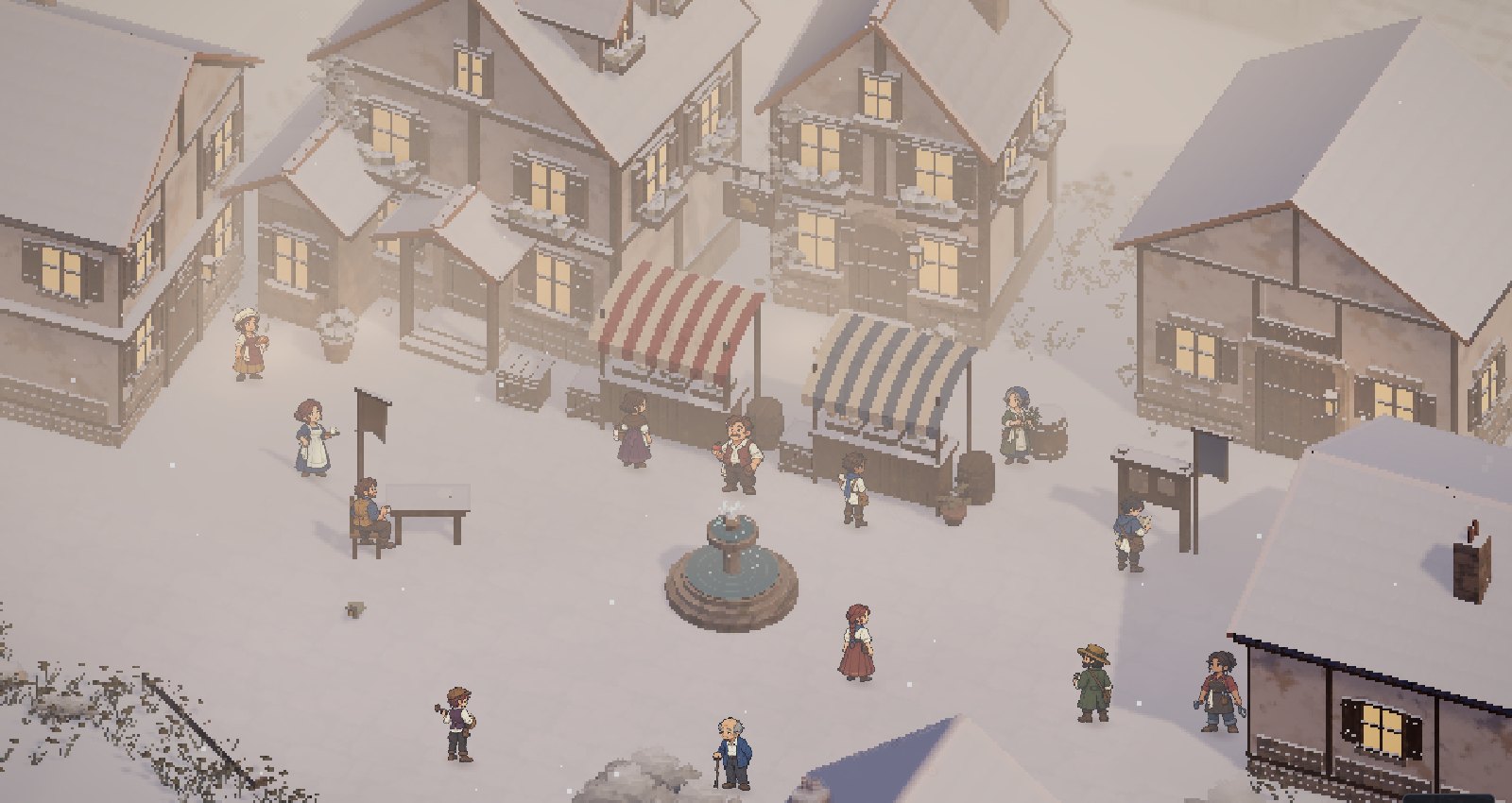
The environment system was built in the first days of October and is meant for every map. A scene is chosen on three independent axes: time of day (morning, day, dusk, night), weather (clear, mist, overcast, rain, snow) and season (base, autumn, winter). A rainy autumn night is simply night plus rain plus autumn, with no separate copy of the values.
Each preset is a partial set of values with four operations in a fixed order: set, multiply, add, clamp. Rain sets cloud cover, wind, rain amount and target wetness, cuts sunlight to about a fifth and shadow strength to a quarter, removes birds and dust, and keeps lamps at least 0.9 on. Layers always stack the same way: base, time, season, weather, event overrides, then regional adjustments, readability limits and a performance cap. Each axis owns its values, so rain can’t undo winter’s pale leaves and nothing can bring the sun back at night. One environment clock drives everything, so the same start, transition log, seed and time always give the same frame. Rain turning to snow passes through zero precipitation, and wetness and snow cover change at their own pace.
Villagers: from a grey mannequin to a walk cycle
The villagers went through more failed methods than anything else. In the first week each villager started from one approved drawing, which an image-to-video model animated and a sprite tool cut into a four-second idle loop with both feet planted. I rejected a version where only the eyes moved; the whole upper body had to breathe. By October 12 nine of the fourteen had approved idles.
On October 15 I decided every villager needs eight directions. The first attempt was thrown away the next day: one villager’s flower hand didn’t match when she faced west, and another, supposedly facing south-west, looked south-east. A three-by-three sheet animated in one video kept changing the number of apples, their height and the grip from cell to cell. On October 18 I tried a Blender model with a rig and a CC0 walk, rendered from eight angles and turned into pixels. It moved, but the drawing lost its life. The idles had worked because the video model moved one drawing as a whole and kept its style. The 3D route swapped arms and legs for 3D pieces and lost it. What I settled on that day is now the only way a villager is made:
- A simple 3D mannequin is posed like the approved idle and rendered in eight directions. It is only a guide.
- From those renders a blueprint is drawn: crown, eye, belt and ground lines, footprints, the apple’s position and which way the body faces.
- An image model draws all eight directions in one pass, using the blueprint, the approved idle and the concept sheet as references, so the directions match.
- A checker compares heights, eye lines between neighbouring directions (within one pixel at game size) and the apple, and overlays mirrored pairs. Only the few pixels the model gets wrong, usually the far eye in three-quarter views, are fixed by hand.
- I approve the sheet before any video is made.
- Each cell is animated separately, pinned as both first and last frame, then cut, aligned to one height, foot line and palette, and reduced to pixels.
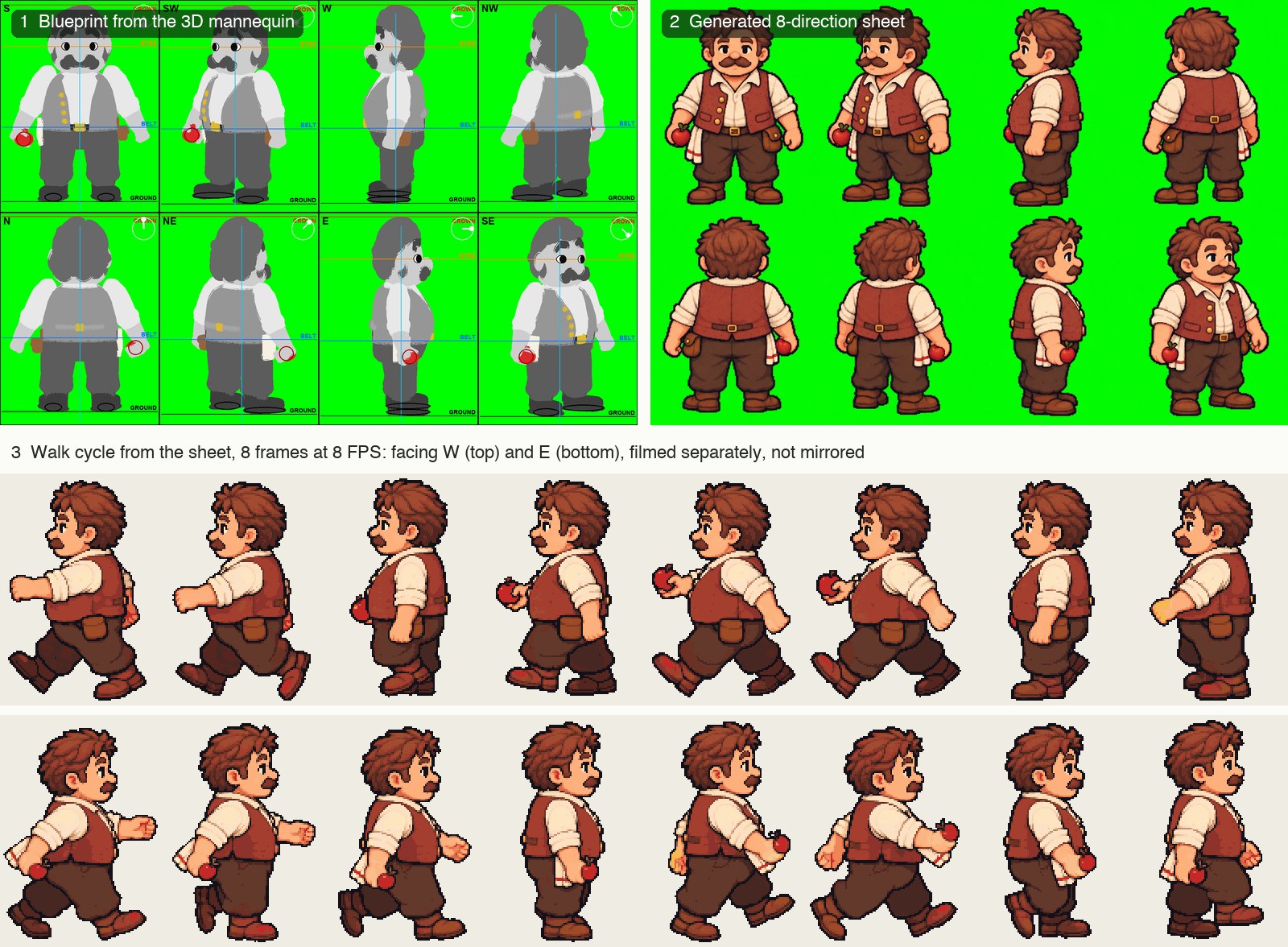
The output is fixed: 160×160 cells, one 39-colour palette, hard alpha, a walk of 8 frames at 8 frames per second and an idle of 32 frames. Directions are never mirrored, or Rowen’s apple, towel and pouch would switch sides. The video model gives a different take every time, so the process expects it: shoot all eight directions, check them on boards, re-shoot only the failures and keep a re-shoot only if it is better. Feeding the model guide lines drawn over the cell made things worse. Rowen’s walk and idle were approved on October 19 and 20, Mirena’s idle with his, and Mirena’s walk and Eda’s sheet and idle on October 27.
Idle behaviour now has three layers: breathing in all eight directions, an occasional habit (Rowen tosses his apple and catches it) and a job action made only for the direction a villager faces in the plan. I approve all of it in a small character studio where you click the ground and the villager walks there. In the village, sheets shrunk to the 50-pixel grid made faces mushy, so a zoomed view enlarges the whole village instead (1.82 times in a 1440-wide window) until each sheet pixel lands on whole screen pixels.
Making it load
By October 24 the rebuilt village took about fifteen seconds to appear. I didn’t want to lose any of the look, so a speed change had to leave the picture exactly as it was: zero differing pixels on reference pictures captured with time frozen, and a frame rate the same or better. Production builds from before and after were measured alternately, never on the development server.
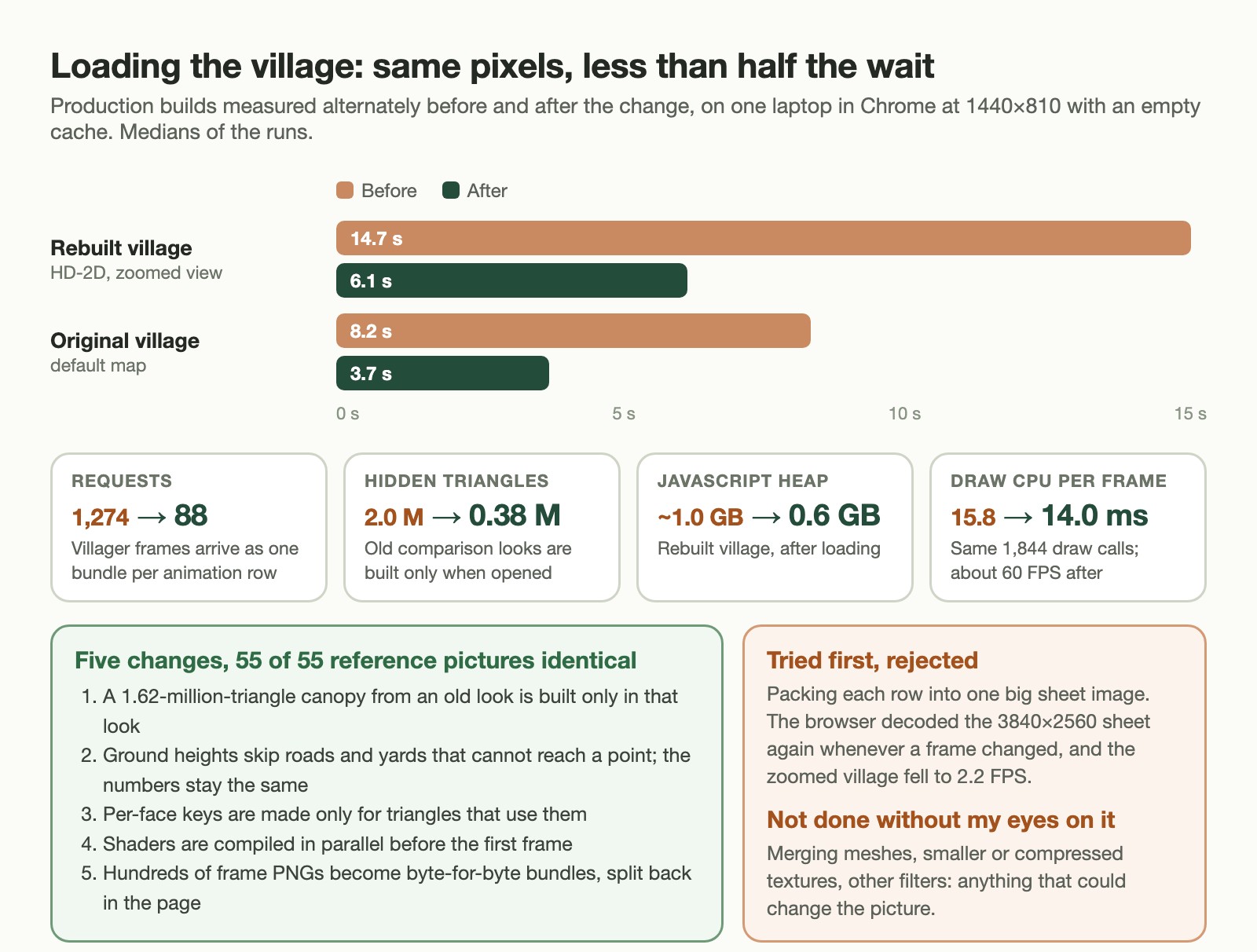
The rules from that work now apply to everything: measure first, don’t build what isn’t visible, don’t repeat heavy work at every load, don’t fetch hundreds of single files, and ask me before anything that could change the picture. Every village round records load time and frame rate against reference values of 6.1 seconds, 60 frames per second and 14 milliseconds of draw time. They are signals, not pass marks: the same code measured four times ranged from 13.8 to 14.2 milliseconds.
A second camera for story scenes
Walking, talking and fighting keep the fixed orthographic camera. On October 26 I added a second one for events and story scenes: perspective shots written as data, each with an angle, distance, field of view, duration, light preset and effects. One of the first scenes shows the sunset the village is named after.
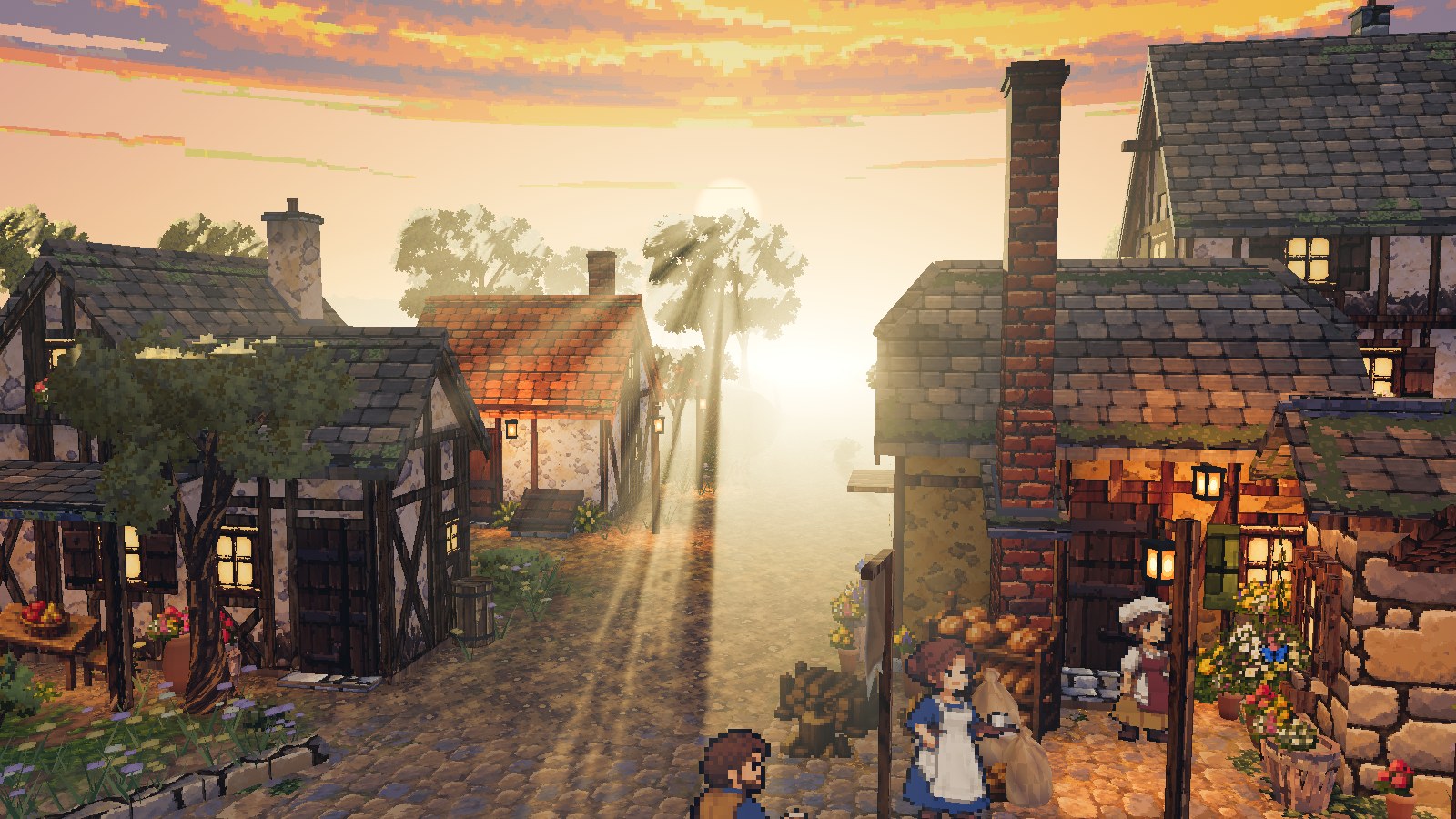
A low camera sees what the play camera never does, so far landscape bands, a sky for each time of day, 1,351 trees of outer forest and the house backs load only for the shots that need them. The backs got the same care as the fronts: target paintings from four hidden angles and a floor plan for every storey, checked so every window opens into a room, stairs reach every floor and every chimney has a hearth. I accepted those on October 28. They aren’t in the game yet.
A studio for the script
On October 26 the story got its own tool. The scenario studio reads the four source documents directly and splits them into 413 entries: prologue to chapter 12, hub conversations, side events, party banter, battle and return lines, residents’ stories and a library of 100 books. Each heading and table row carries a stable ID in a hidden comment, so renaming or moving a scene keeps its history. A review stores status, notes, flagged passages and a fingerprint of the text reviewed; if the text changes, the entry goes back to “needs re-review”. Only 29 of the 100 books have text so far, and empty ones are left out of the review rate instead of counting as passed.
What a month of mistakes taught me
Fablemarch began on October 4 as an ink-wash battle sketch inspired by Codrops’ article on Still, a generative ink-wash garden. The same day I tried 3D pixel art with KayKit’s free CC0 models by Kay Lousberg and three.js’s pixelation pass, after looking at Eduardo Schildt’s MIT-licensed Godot 3D pixel-art demo. The village grew out of that test; the battle sketch left the repository on October 19. What I’d keep:
- Settings don’t draw pixels. Resolution, filters and blur can’t replace detail nobody painted.
- Fix the source, not the screen. A defect fixed only in code comes back.
- Judge in the game at real size. Tree cards looked fine on a contact sheet and wrong in the scene.
- A passing number is not approval. A check says something is within limits; whether it looks right is still my call.
- Prove speed work with pixels. “It looks the same” isn’t a test. Zero differing pixels is.
What isn’t decided yet
- Combat, rewards, upgrades and saving are unbuilt, and how fields and dungeons will be made is open.
- Three of the fourteen villagers have eight-direction sheets. The other eleven still use their earlier single-direction art.
- The rebuilt village, its 64-texel surfaces, whether the zoomed view becomes the default, the story camera and the house backs all await my final judgement at real size.
- Session length, the number of regions and all prices are guesses until they’re tested.
I’ll keep posting as this takes shape. If it changes direction completely, that will be in a note too.
All images are captures of a development build or files from the project itself: Blender renders, a generated character sheet and a chart drawn from the measurements.