Tag: Productivity

  • Codex for work: OpenAI pushes Codex beyond developers

    Codex for work: OpenAI pushes Codex beyond developers

    Codex for work is OpenAI’s clearest attempt yet to turn Codex from a coding assistant into a broader workplace agent. On June 2, 2026, OpenAI introduced six role-specific plugins, a Sites preview, and annotations that let teams refine generated documents, slides, spreadsheets, code, and web pages in place.

    The short version

    • OpenAI says more than 5 million people use Codex each week, and non-developers now make up about 20% of the user base.
    • The first six role-specific plugins cover data analytics, creative production, sales, product design, public equity investing, and investment banking.
    • Together, those plugins bundle 62 apps and 110 skills, including tools such as Snowflake, Tableau, Figma, Canva, Salesforce, HubSpot, FactSet, PitchBook, and Hebbia.
    • Sites lets Business and Enterprise customers preview shareable hosted web pages and lightweight apps built from Codex output.
    • The useful question is whether teams can govern permissions, data access, and review workflows well enough to trust Codex for work outside engineering.

    What happened

    OpenAI announced a workplace-focused Codex update on June 2, 2026. The company says Codex began as a software development tool, but analysts, marketers, operators, designers, researchers, investors, and bankers now represent about one-fifth of overall Codex users. OpenAI also says that non-developer usage is growing more than three times as fast as developer usage.

    The update has three parts. Role-specific plugins connect Codex to app bundles and instructions for common business jobs. Sites turns Codex output into hosted pages and lightweight apps that can be shared inside a workspace. Annotations let users point to a specific part of a generated artifact and ask Codex to change that section without regenerating the whole thing.

    OpenAI framed the release around internal and customer examples. Its own non-technical teams use Codex for internal apps, executive materials, dashboards, and creative briefs. Zapier teams use it to pull context from Slack, Google Docs, and Coda before turning that information into postmortems, incident response plans, and feature tickets. NVIDIA researchers use Codex to speed up experiment workflows, including research ideation and machine learning infrastructure scripts.

    Why Codex for work is worth watching

    Codex for work is worth watching because OpenAI is packaging the agent around jobs, not around generic chat prompts. The six initial plugins are built for data analytics, creative production, sales, product design, public equity investing, and investment banking. OpenAI says those plugins collectively include 62 popular apps and 110 skills.

    That packaging matters for enterprise buyers. Most white-collar workflows do not live in a single application. A sales follow-up may involve CRM data, meeting notes, customer history, Slack context, and a document that someone needs to approve. A product design review may touch a live URL, Figma work, screenshots, and user-flow notes. Codex becomes more useful if it can move across that stack with enough context and with permissions that admins understand.

    The release also puts OpenAI closer to workflow software vendors. Teams may still need systems of record, audit trails, domain-specific controls, and durable integrations. Even so, an agent that can create a dashboard, revise a slide, and open the right tool chain changes what a lightweight internal app or operations dashboard needs to be.

    What does Codex for work change for builders?

    Codex for work changes the builder question from “can an agent write code?” to “can an agent ship a useful internal workflow with the right data, surface, and review loop?” Sites is the clearest sign of that shift. OpenAI says Business and Enterprise customers can preview interactive hosted websites and apps that teams share by URL inside a workspace.

    The examples are small but telling: a customer review page with product updates and usage trends, a financial scenario planner built from a model, or a launch hub with messaging, milestones, owners, and decisions. These are exactly the kinds of tools that often start as spreadsheets, internal dashboards, Notion pages, or scrappy no-code apps.

    For app builders, the pressure is not that every product becomes obsolete overnight. The pressure is that rough internal tools may become easier to generate near the point of work. Products with proprietary data, workflow depth, compliance features, and reliable collaboration still have room. Products that mostly package a thin UI around simple data views will have to prove why users should leave the agent workspace.

    For more context on similar AI tooling shifts, see the IT & AI archive.

    What Hacker News readers are arguing about

    The Hacker News discussion is short, so it reads more like early sentiment than broad evidence. The strongest positive thread is practical: one commenter described a non-technical partner building a useful sales dashboard with accurate Metabase data through a site-builder style tool. That reaction lines up with OpenAI’s pitch that non-developers can now create useful artifacts without learning software development first.

    The skeptical thread focuses on SaaS defensibility. Commenters wondered what happens to dashboard and workflow SaaS companies when a model provider can generate the interface, connect the data, and host the result. One commenter called out deployment as a weakening moat, especially after OpenAI models became available on AWS. Another described the move as a warning against building too close to someone else’s platform.

    The useful read is that the thread is excited and uneasy at the same time. Developers can see the productivity gain, but they also see OpenAI moving vertically into use cases that used to belong to separate tools. Four comments are not a market survey, but they capture the right tension: Codex for work looks valuable precisely because it overlaps with products people already pay for.

    The practical read

    Teams should treat Codex for work as an enterprise workflow experiment, not as a finished replacement for business software. The first pilots should use bounded work: internal dashboards, meeting follow-ups, customer review pages, launch hubs, prototype reviews, or research summaries where a human owner can verify the output before anyone relies on it.

    The main buying questions are mundane and important. Which apps can Codex access? Who approves those permissions? Can admins separate sales data from finance data? Does the generated Site preserve source context? Can teams audit who changed a document, spreadsheet, or slide after an annotation? If those answers are weak, the tool may still be useful for drafts, but not for regulated or revenue-sensitive workflows.

    Builders should watch the partner ecosystem around Sites and plugins. If Vercel, Wix, Base44, Replit, Lovable, Figma, Webflow, and other partners make agent-generated work easier to deploy and revise, the boundary between coding assistant, no-code builder, and collaboration app will keep getting blurrier. That is the competitive change to track.
    Sources

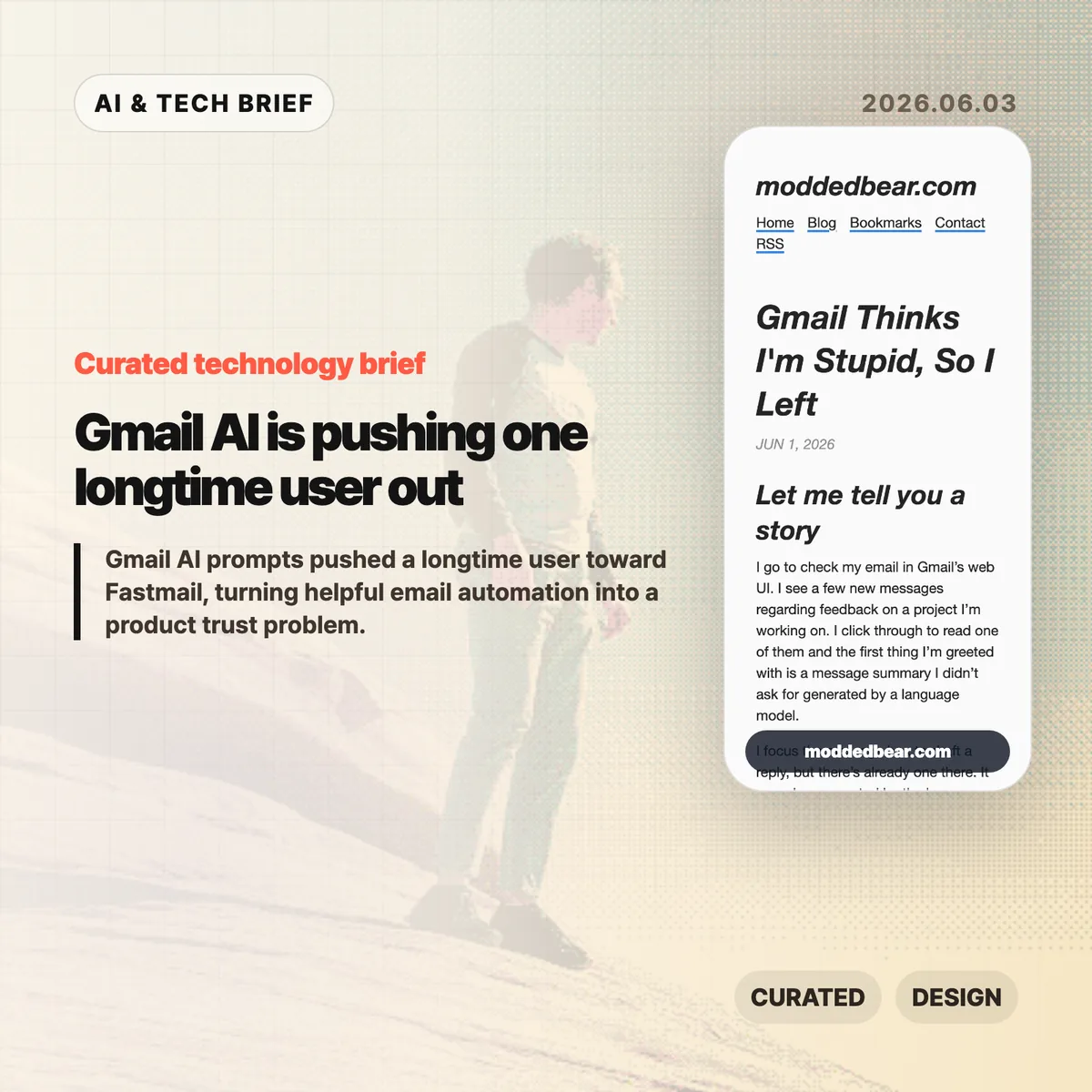
  • Gmail AI is pushing one longtime user out

    Gmail AI is pushing one longtime user out

    Gmail AI is no longer a quiet side feature for every user. In a June 1, 2026 post, developer JP described leaving a 16-year Gmail account after the web UI kept inserting AI summaries, reply drafts, and writing prompts into ordinary email work. By June 2, the post had reached Hacker News, where the discussion drew more than 600 points and hundreds of comments about forced AI in everyday tools.

    The short version

    • A longtime Gmail user says the web UI showed an unsolicited message summary, an AI-generated reply draft, a “Help me write” nudge, and a “Tab to improve” prompt while reading and writing email.
    • The author is moving toward a custom domain and Fastmail after 16 years on Gmail, partly because some unwanted smart features are hard to separate from useful older Gmail behavior.
    • The Hacker News discussion drew 399 comments and focused less on whether AI can write emails, and more on whether Google, Microsoft, and other large platforms are forcing AI into workflows to satisfy internal product metrics.
    • For product teams, Gmail AI is a useful warning: AI assistants need clear consent, easy opt-out controls, and restraint in high-trust communication tools.

    What happened

    JP’s June 1 post describes a specific Gmail web session: Gmail showed an unsolicited message summary, inserted a generated reply draft, promoted “Help me write,” and later suggested “Tab to improve.” The post says the prompts appeared while JP was reading project feedback and composing ordinary email, which made Gmail AI feel like a judgment on the user’s own reading and writing.

    The author says some Gmail AI settings can be disabled, but the controls are not cleanly separated from older Gmail features such as automatic thread categorization. That coupling matters because an off switch should not make users give up unrelated mail organization. JP’s response was to start leaving Gmail after 16 years, connect a custom domain to a mail host, try Fastmail, and set up multiple domains and aliases. The switching cost makes the story useful for product teams: email users rarely move unless irritation has become durable.

    Why Gmail AI is worth watching

    Gmail AI is worth watching because email is one of the worst places to make users feel managed by software. Reading a message, deciding tone, and writing a reply are small acts of judgment. If an AI assistant appears before the user asks for help, the product can make a competent person feel supervised rather than supported.

    The useful distinction is not AI versus no AI. Many people want summaries, drafts, translation, and tone help in email. The problem is where the assistant sits in the workflow. A visible command, a compose toolbar button, or a clearly labeled opt-in feature gives users control. A recurring prompt next to the cursor changes the mood of the tool. It turns the inbox from a communication surface into another place where the platform asks for attention.

    That is why this story travels beyond Gmail. Builders adding AI to mature products have to decide whether the assistant is a tool the user summons or a layer the company pushes across the interface. The first can save time. The second can make users wonder whose workflow the product is serving.

    What does Gmail AI change for builders?

    Gmail AI changes the product design question from “can this model help?” to “who gets interrupted, and when?” For email clients, CRMs, support desks, note apps, and developer tools, an AI writing feature touches communication, privacy, and user confidence at the same time. A weak suggestion in Gmail is not only weak text. It can make the product feel as if Google is grading the user.

    App builders should treat AI writing features like power tools. Put the assistant behind a deliberate action, keep the off switch separate from unrelated features, and avoid prompts that appear under the cursor while someone is composing. If the feature learns from user content or appears in a sensitive workflow, explain the setting in plain language. A smaller product can also compete by promising less noise: the assistant is available when asked, and quiet the rest of the time. For more IT and AI product briefs, see the IT & AI archive.

    What Hacker News readers are arguing about

    The Hacker News discussion reached roughly 642 points and 399 comments by June 3, and the argument was mostly about control. Readers treated the Gmail AI story as part of a broader platform pattern: Microsoft Copilot prompts, LinkedIn’s AI-heavy feed, Windows setup screens, Apple Intelligence, and Linux desktops all became comparison points for software that either respects or interrupts user intent.

    The strongest objection was that the same Gmail behavior is not visible to everyone. Some readers had never seen the prompts, while others pointed to Gmail settings for Smart Reply and broader smart features. That makes the story weaker as a universal Gmail diagnosis, but stronger as a rollout lesson. If account settings, Google Workspace policies, regions, or feature flags change the experience, Gmail needs clearer language about what is on, what is off, and what users lose when opting out.

    The practical thread focused on alternatives such as Fastmail, Proton Mail, Apple Mail, self-hosting, Linux desktops, and GrapheneOS. Commenters still acknowledged email switching costs, self-hosted deliverability problems, and the compromises in every provider. The frustration was less “AI is useless” and more “default software has become too needy.”

    The practical read

    Gmail AI is a product trust story before it is an AI capability story. Google may have good reasons to put Gemini-powered summaries and writing help inside Gmail, and some users will benefit from them. The risk is that email is a habit product. If the interface nags at the wrong moment, the user does not evaluate the model in isolation. He judges the whole service.

    For teams shipping AI features, the checklist is simple. Put the assistant behind a deliberate action. Keep the off switch separate from unrelated non-AI features. Avoid prompts that appear under the cursor while someone is composing. Measure repeat voluntary use, not accidental exposure. If users are moving a 16-year account because the interface feels condescending, the feature is no longer just an experiment.

    For users, the lesson is more practical: own the domain if email matters. A custom domain does not remove migration work, spam filtering problems, or provider lock-in, but it makes the next move less painful. JP’s move toward Fastmail is a reminder that switching email is still possible, especially before a provider becomes the only address people know.

    Sources

  • Cursor Developer Habits Report shows AI coding is changing shape

    Cursor Developer Habits Report shows AI coding is changing shape

    Source: The Cursor Developer Habits Report

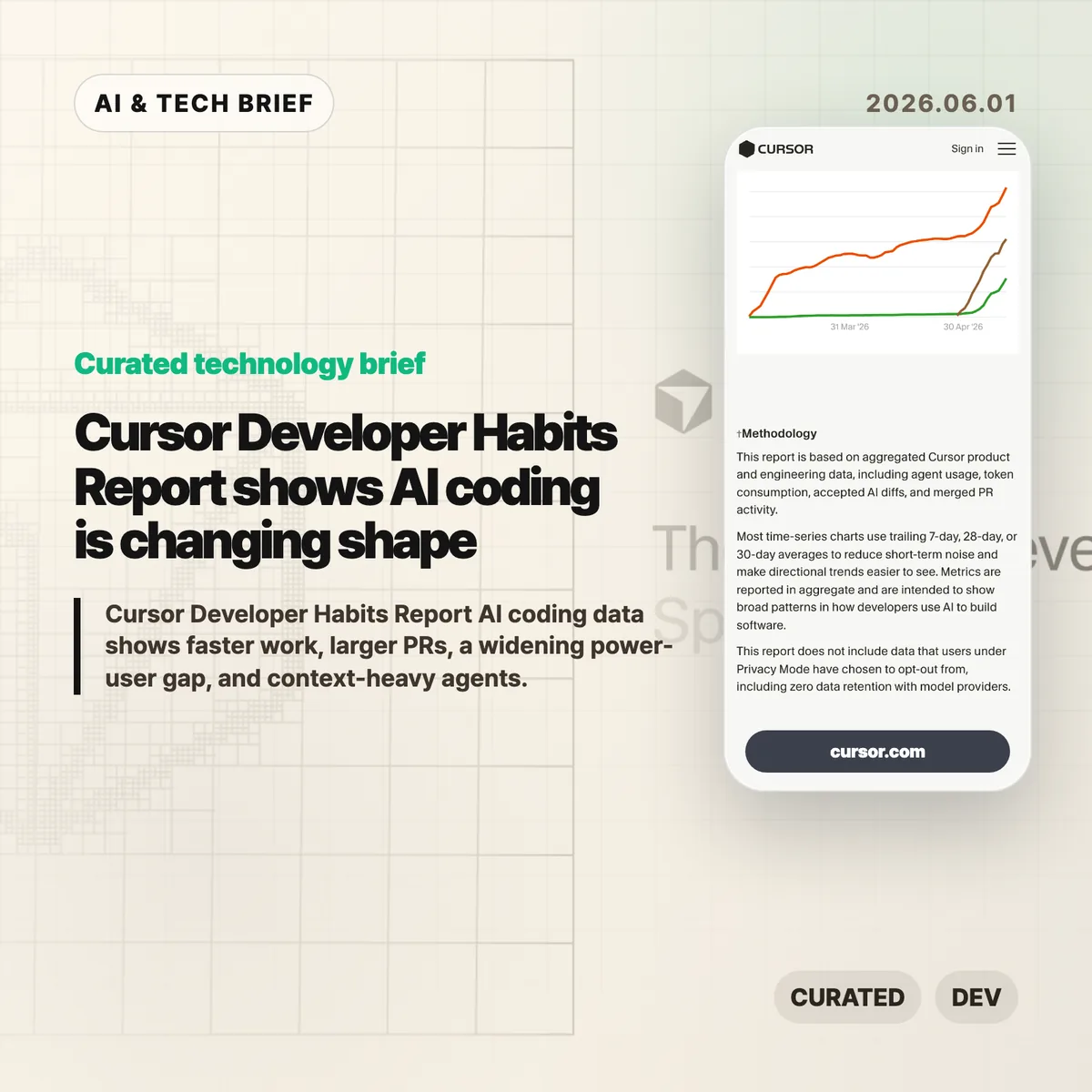
    AI coding tools are no longer just making autocomplete feel smarter. Cursor’s Spring 2026 Developer Habits Report points to something messier: more code, larger PRs, deeper agent sessions, and a widening gap between casual users and people who have turned agents into a real workflow.

    The short version

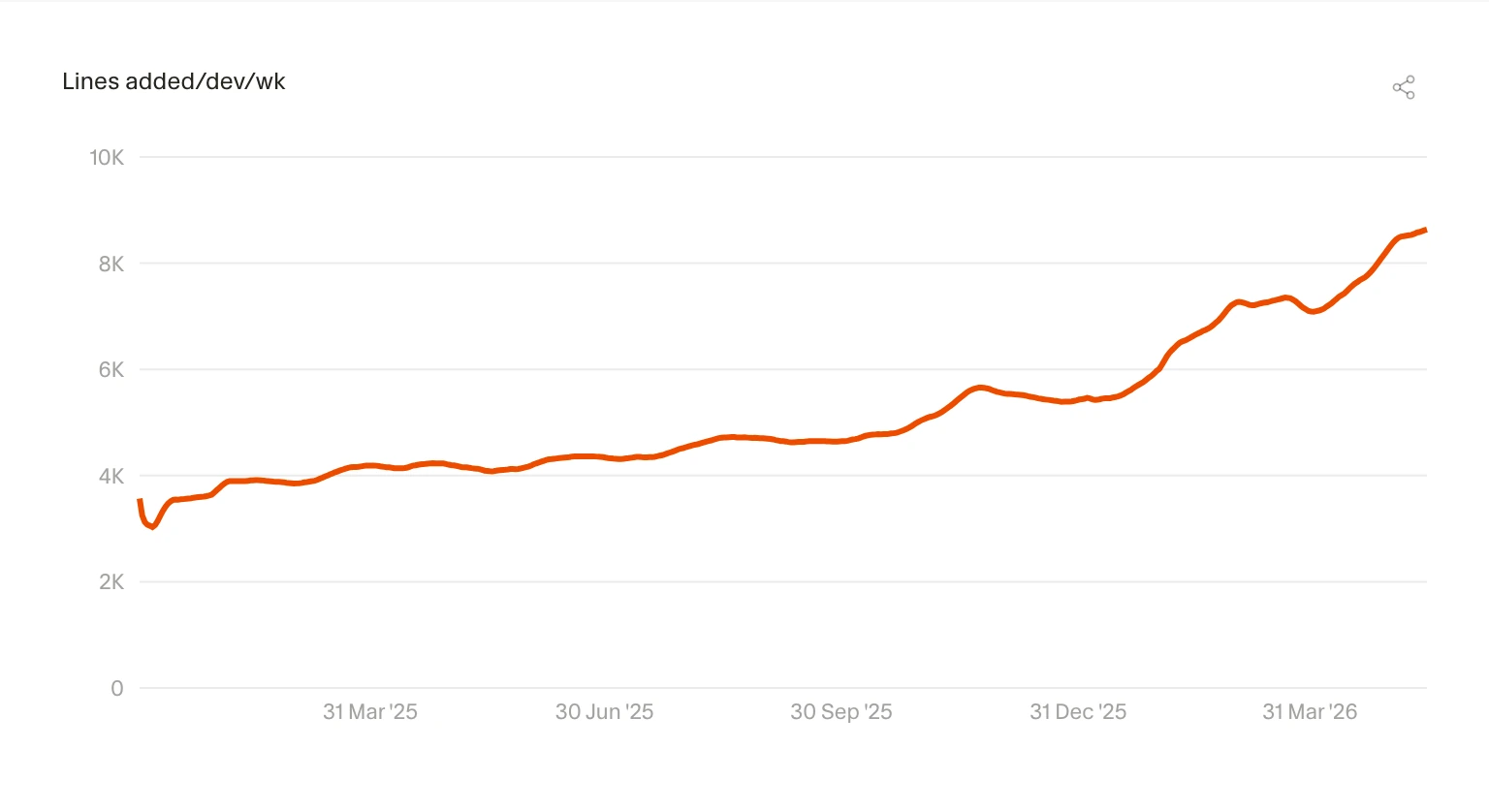
    • The Cursor Developer Habits Report says lines added per developer per week rose from 3.6K in early 2025 to 8.6K by May 2026.
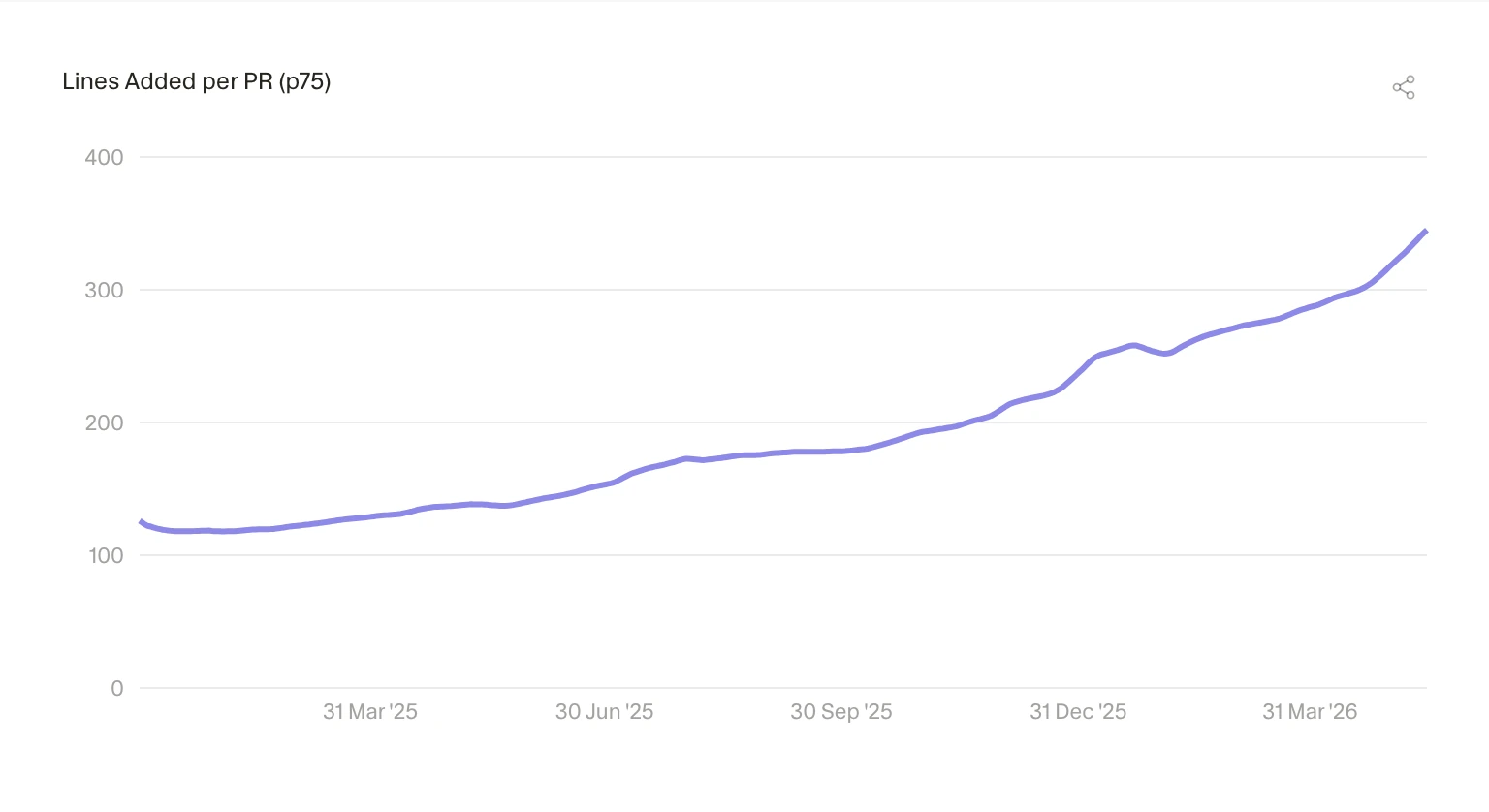
    • PRs are getting much larger. The p75 lines added per PR moved from 125.86 to 345.02.
    • Big PRs are less rare now: merged PRs with at least 1,000 changed lines rose from 8.0% to 13.8%.
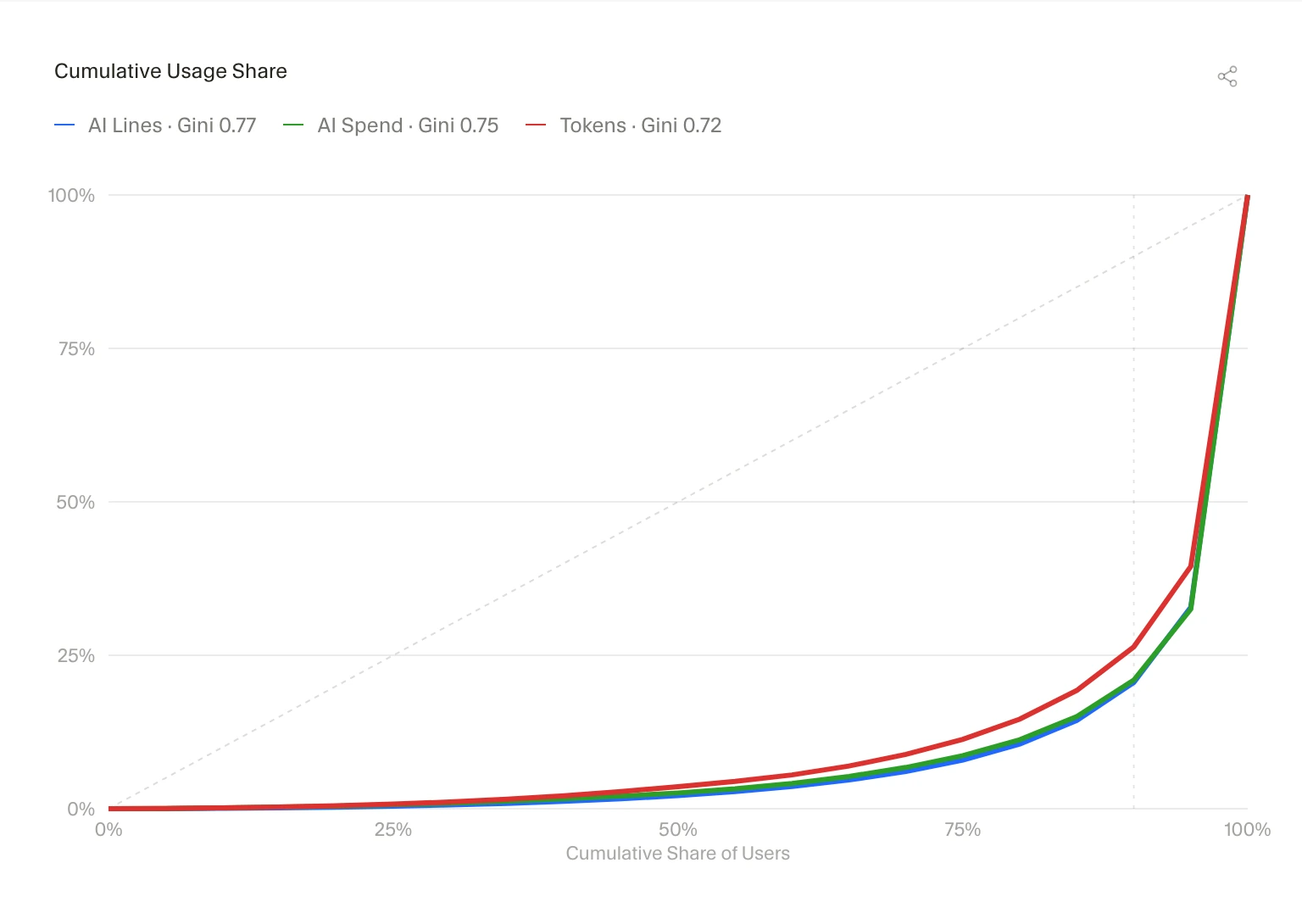
    • AI usage is concentrated. Cursor reports Gini scores of 0.77 for AI lines, 0.75 for AI spend, and 0.72 for token consumption.
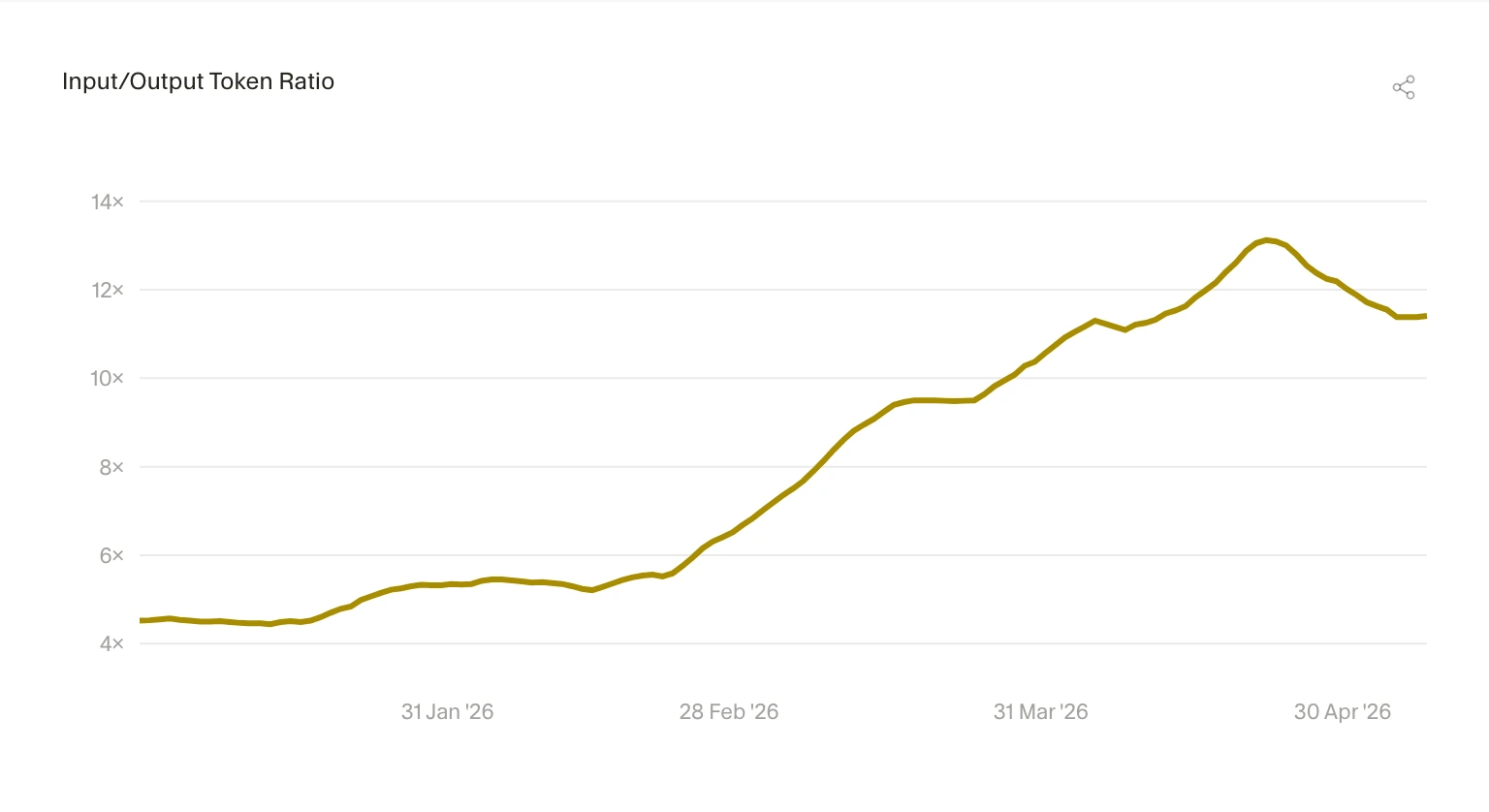
    • The input/output token ratio rose from 4.52× to 11.41×, which means agents are reading far more before they write.

    What happened

    Cursor published a product-data report on how developers are using AI inside its coding environment. The headline number is easy to understand: developers are adding more code. But the more useful signal is that the unit of work is getting bigger.

    Lines added per developer per week rose from 3.6K to 8.6K. That is a big jump. It is also a dangerous number to overread. More lines can mean more output. They can also mean more churn, more review load, or more code that somebody has to clean up later.

    Cursor chart showing weekly lines added per developer
    Cursor chart showing weekly lines added per developer

    Source: The Cursor Developer Habits Report

    The PR data is harder to ignore. The p75 lines added per PR went from 125.86 to 345.02, and the share of merged PRs with at least 1,000 changed lines rose from 8.0% to 13.8%. That changes the reviewer’s job. A larger diff needs a clearer intent, better tests, and a smaller blast radius.

    Cursor chart showing p75 lines added per pull request
    Cursor chart showing p75 lines added per pull request

    Source: The Cursor Developer Habits Report

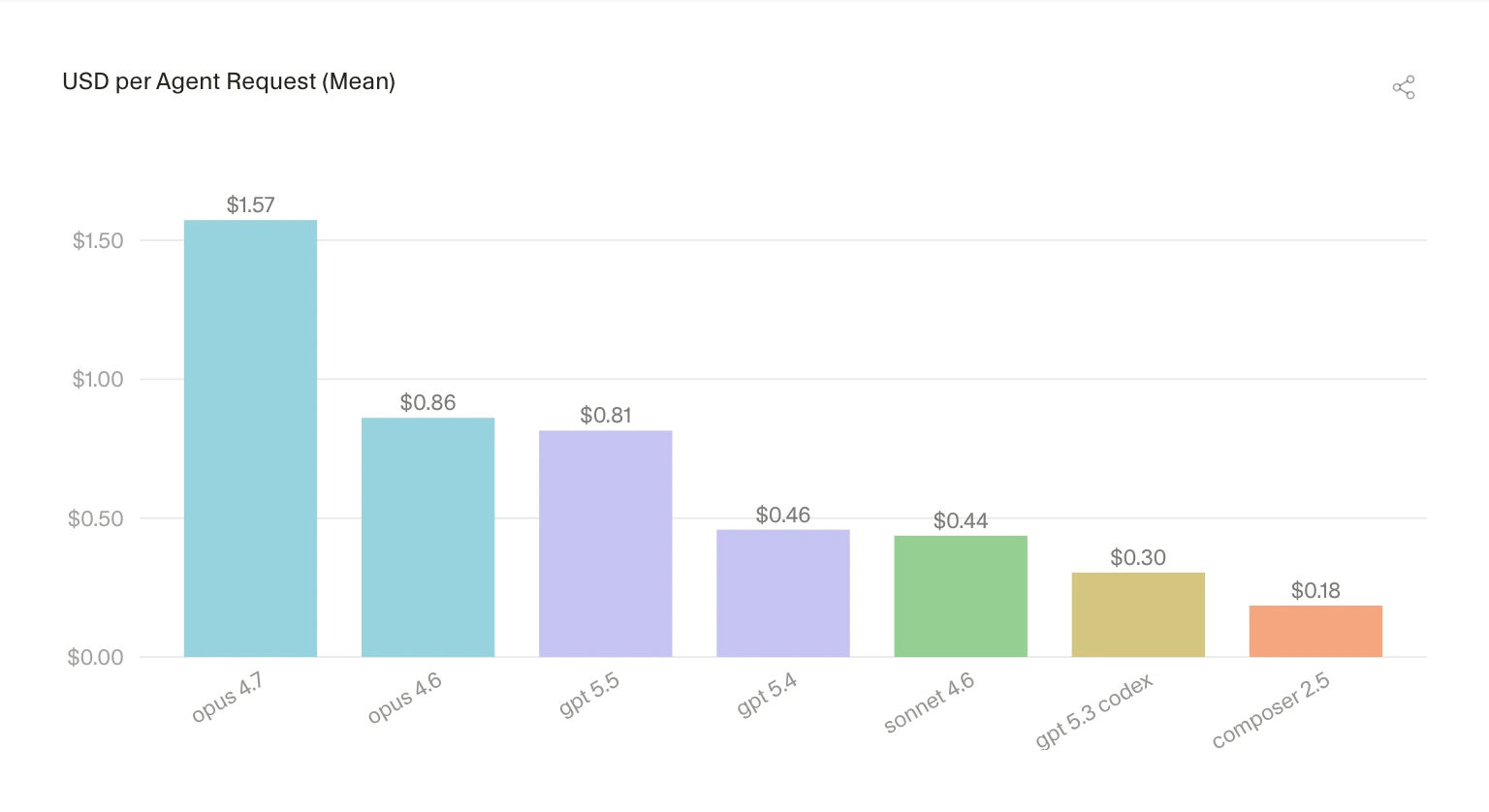
    Cost is part of the story too. Cursor shows average agent request cost varying from $1.57 for opus 4.7 to $0.18 for composer 2.5. The gap gets narrower when measured by accepted added line, but it does not go away. Model choice now affects product quality and margins at the same time.

    Cursor chart comparing average agent request cost by model
    Cursor chart comparing average agent request cost by model

    Source: The Cursor Developer Habits Report

    Why this is worth watching

    The Cursor Developer Habits Report is useful because it shows the awkward middle stage of AI coding. The tools are good enough to change how people work, but not clean enough to remove the need for discipline.

    Bigger PRs are not automatically better. Deeper agent sessions are not automatically safer. Cursor also reports that the 60-minute survival share for accepted AI lines rose from roughly 76% to 81%, which is a decent signal. But a line surviving for an hour is not the same as a line staying cheap to maintain for six months.

    The power-user gap may be the most important part. If the top users learn how to scope work, feed context, inspect diffs, and run checks, their curve bends faster than everyone else’s. Buying the tool does not spread that skill evenly across a team.

    Cursor chart showing AI usage concentration and Gini scores
    Cursor chart showing AI usage concentration and Gini scores

    Source: The Cursor Developer Habits Report

    AI coding notes for builders

    For developer-tool teams, the context numbers are the part to stare at. The input/output token ratio climbed above 11×. That suggests the agent experience is becoming a reading problem as much as a writing problem.

    Cursor chart showing input to output token ratio growth
    Cursor chart showing input to output token ratio growth

    Source: The Cursor Developer Habits Report

    Repo maps, search, cache behavior, tool calls, terminal output, and review surfaces may matter as much as the base model. Users do not experience “model quality” in the abstract. They notice whether the agent understood their codebase or confidently edited the wrong thing.

    What the discussion is missing

    Cursor’s data comes from real product usage, which makes it more useful than a survey. It is still Cursor’s own user base. Treat it as a strong signal, not an industry-wide average.

    The missing comparison is downstream quality. Defect rates. Rollbacks. Review time. Test coverage. Maintenance cost after AI-assisted changes land. Lines added and PR size are easy to chart. Engineering health is where the bill shows up later.

    The practical read

    Engineering leaders should watch review systems alongside AI adoption. If agents make PRs larger, teams need sharper change descriptions, better test evidence, and a habit of splitting risky work before it becomes unreadable.

    Individual developers should treat AI coding as a workflow skill. Ask for smaller changes. Provide the files that matter. Read the diff. Run the tests. Reject output quickly when it drifts. That sounds boring, but that is the difference between speed and cleanup.

    For more AI and developer-tool coverage, see the AI & Technology archive.

    Sources

  • AI productivity should buy back Friday before output

    AI productivity should buy back Friday before output

    AI productivity is usually sold as faster work, cheaper work, or more work. Mike Su asks the more awkward question: if AI can turn a week of white collar output into a much shorter sprint, can workers take Friday off? The post is short and playful, but the argument lands because it goes straight at the missing line in most AI adoption decks: who gets the saved time?

    The short version

    • Mike Su’s “Can we have the day off?” asks whether claimed 10x AI productivity should translate into a four-day workweek for white collar workers.
    • The strongest version of the argument is about distribution, not model capability. If AI agents compress work, employees will ask for time, pay, or both.
    • Hacker News readers turned the joke into a labor debate: some saw a serious bargaining question, while others argued market competition will push companies to demand more output instead.
    • For builders, the product lesson is blunt. AI tools that only promise management more throughput may make employees feel less secure, even when the software is useful.

    AI productivity and the four-day workweek

    Su’s post starts from a familiar claim: AI is supposed to raise white collar productivity by a large multiple. If that premise is true, he asks, why should the gain only appear as more output for the employer?

    The concrete proposal is deliberately simple. People work Monday through Thursday. On Thursday they prepare prompts and tasks. On Friday, AI agents keep working while the humans take the day off. It is partly a joke, but it exposes a real gap in the current workplace conversation.

    Most companies talk about AI productivity as capacity. Ship faster. Write more. Support more customers. Close more tickets. Employees hear a different message: use the same hours to do more, with no guarantee of higher pay, more leave, or better job security.

    That is why the Friday framing works. It turns an abstract productivity claim into a payroll and calendar question.

    What happened

    The original essay, published on May 27, 2026, is a short personal blog post titled “Can we have the day off?” Su writes that if AI can produce the same work in a fraction of the time, then a four-day schedule should be a reasonable ask. He even imagines Friday as an “AI workers’ day,” where agents run while humans are out of the office.

    The post does not present a benchmark or a policy plan. It is closer to a pressure test for the way AI is being marketed inside companies. If executives believe AI can multiply output, employees can reasonably ask whether some of that gain becomes time off.

    That makes the piece useful beyond the joke. For more IT and AI workplace briefs, the IT & AI archive tracks similar shifts in automation, developer tools, and product operations.

    Why this is worth watching

    AI productivity gains are easy to claim and hard to divide. A team can adopt coding assistants, research agents, summarizers, and workflow bots without ever agreeing on what happens to the saved hours.

    That silence creates a management problem. If a company tells employees that AI will make them vastly more productive, but keeps the same schedule and raises the output target, the tool starts to look like surveillance with a nicer interface. If the company offers a share of the gain, through shorter workweeks, better compensation, or fewer low-value tasks, adoption has a better chance of feeling like a deal instead of a threat.

    The four-day workweek is only one possible answer. The larger question is whether AI productivity becomes a worker benefit, an owner benefit, or a mix of both. That question will shape how teams talk about agents, copilots, and automation over the next few years.

    What Hacker News readers are arguing about

    The Hacker News thread was large: more than 1,300 points and hundreds of comments when checked. The first serious thread picked up the post’s main point almost exactly. If employees help introduce AI into their workflows, one commenter argued, they should ask what they get in return: days off, higher pay, or some other concrete share of the gain.

    A second camp was more cynical. They argued that productivity gains usually flow to owners, especially when workers are worried about layoffs. Several comments connected the issue to older automation cycles: computers, software, and the internet made many tasks faster, but the standard workweek did not shrink much for most employees.

    The useful objection in the discussion is competition. Some readers argued that a company offering Fridays off could be outpaced by rivals that use AI to work faster all week. Others pushed back, pointing out that many companies already waste huge amounts of time on busy work, weak coordination, and rework. More hours do not automatically mean more useful output.

    There was also a policy thread. Some readers moved from employer-level bargaining to unions, worker protections, taxes, UBI, and social safety nets. That jump matters because it suggests the four-day workweek may be hard to win company by company if the market rewards whoever turns AI into raw output first.

    Treat the thread as sentiment, not proof. But the sentiment is clear enough: workers are starting to ask whether AI productivity will give them leverage or simply raise the bar.

    The practical read

    If you run a team, do not pitch AI productivity only as acceleration. Say what happens to the saved time. Will it reduce after-hours work? Remove recurring busy work? Change sprint scope? Create a trial four-day schedule after the team proves the workflow? Vague promises will not survive contact with calendars.

    If you build AI tools, this is a product positioning issue. A tool that says “your manager can get 10x more from you” and a tool that says “your team can finish the same work with fewer wasted hours” may have similar features, but they land very differently.

    For employees, the move is to make the bargain explicit. Track which tasks AI actually shortens, how much review work remains, and where quality still depends on humans. Then ask for a share of the gain in terms that can be measured: time off, compensation, narrower scope, or fewer low-value meetings.

    AI productivity will not automatically create a shorter workweek. Someone has to ask for it, price it, and design the workflow around it.

    Sources

  • The orchestration tax is the real limit on AI agents

    The orchestration tax is the real limit on AI agents

    The orchestration tax is Addy Osmani’s name for the cost developers pay when many AI agents produce work faster than one human can review it. The pitch for agentic coding often starts with parallelism. The harder question is what happens when every result still has to pass through one person’s judgment.

    The short version

    • The orchestration tax appears when launching AI agents is cheap but reviewing their output is still slow.
    • Osmani argues that the scarce resource is not agent runtime. It is the developer’s attention.
    • More agents can deepen the review queue instead of increasing merged, reliable work.
    • The useful operating rule is backpressure: scale agents to review capacity, not to whatever the UI allows.
    • This matters for builders of agent tools because workflow design may matter more than raw parallel execution.

    What happened

    Addy Osmani, a Google Cloud AI director and longtime developer advocate, published a short article on X titled “The Orchestration Tax.” It grew out of a Google I/O panel with Richard Seroter, Aja Hammerly, and Ciera Jaspan about where software engineering is going as AI agents become normal parts of the development workflow.

    His argument is blunt: starting more AI agents is easy, but there is still only one person reading the diffs, resolving conflicts, and deciding whether the work fits the system. That makes the human reviewer the serial resource in an otherwise concurrent system.

    Osmani uses two familiar software ideas to frame the problem. The first is Python’s Global Interpreter Lock: many threads can exist, but work that needs the lock still runs through one choke point. The second is Amdahl’s Law: parallel speedup is capped by the part of the process that cannot be parallelized. In agentic software development, he says, that serial part is judgment.

    Why this is worth watching

    The orchestration tax is useful because it moves the AI agent debate away from demos and toward throughput. A dashboard full of active agents can feel productive. That does not mean the team is shipping better code.

    The risk is cognitive debt. If developers accept agent output because forming an independent opinion has become too tiring, they lose the mental model of their own codebase. The failure may not show up on the same day. It shows up later, when production breaks and nobody can explain why the system works that way.

    Osmani’s practical advice is closer to systems design than personal discipline. Use backpressure. Keep the parallel agent count low enough that reviews stay real. Split work into two piles: isolated tasks that can run in the background, and complex tasks where the human judgment is the work. Batch reviews instead of constantly context-switching between half-finished threads.

    That framing is also relevant to the broader IT & AI archive, where the pattern keeps repeating: the biggest gains from AI tools often depend on the boring workflow around the model.

    What Hacker News readers are arguing about

    There is a Hacker News submission for the piece, but it had no meaningful discussion at the time this brief was prepared. That silence is still mildly interesting. The post is not a benchmark launch or a new model release, so it does not trigger the usual speed-and-capability fight.

    The useful debate to have is more operational: how many agents can one engineer review without lowering standards, and what evidence should an agent produce before a human spends attention on it? Tests, screenshots, small diffs, and clear handoff notes are not glamorous. They are what make agent work reviewable.

    A fair skeptical view is that “orchestration tax” may just be a new label for old engineering management problems: code review queues, merge conflicts, and context switching. That is partly true. The new part is the imbalance. AI agents make it much easier to create parallel work than to create parallel understanding.

    The practical read on orchestration tax

    If you run AI coding agents, treat review attention as a capacity limit. Start with one or two concurrent agents on contained tasks. Require each agent to produce evidence before you review the result: a passing test, a screenshot, a concise change summary, or a small diff that can be understood in one sitting.

    Do not use agent count as the success metric. Use merged work that you still understand. If the queue grows faster than you can review it, reduce the fleet. The orchestration tax is paid either way; the choice is whether you pay it deliberately in workflow design or later through shallow reviews and stale system knowledge.

    For product teams building agent platforms, the lesson is awkward but valuable. The winning feature may not be “run 20 agents.” It may be better batching, clearer review packets, dependency boundaries, and defaults that protect the human reviewer from becoming the bottleneck nobody wants to measure.

    Sources

  • Neovim developer workflow: why modal editing still sticks

    Neovim developer workflow: why modal editing still sticks

    The Neovim developer workflow has outlasted several waves of shiny editors because it is built around editing as a repeatable grammar, not a panel-heavy app. Caio Bianchi’s May 26 essay is personal, but the argument lands beyond nostalgia: developers keep returning to Neovim when they want a fast, programmable editor that follows them from a local project to SSH, tmux, Git, tests, and Markdown.

    The short version

    • Bianchi says he started using Vim in 2011 and still picks Neovim after trying VS Code, JetBrains IDEs, Sublime, Atom, Zed, and others.
    • His case for Neovim is less about raw typing speed and more about motions, text objects, macros, and repeatable edits that stay useful for years.
    • Modern Neovim is not frozen in old Vim culture. Lua configuration, built-in LSP, Treesitter, snippets, formatters, and plugin managers such as Lazy.nvim make it feel current without turning it into a giant dashboard.
    • The Hacker News thread is tiny, but the one substantive reply echoes the same pattern: other editors come and go, while Vim or Neovim becomes the tool people keep returning to.

    What happened

    Bianchi published “A Love Letter to Neovim,” a first-person essay about why Neovim remains the editor he trusts most after roughly fifteen years with Vim and Neovim. The piece is not a feature checklist. It is an argument for a way of working.

    The center of the essay is Vim’s editing grammar. ci" changes text inside quotes. dap deletes a paragraph. . repeats the last change. Macros turn a boring edit into something the editor can replay. Text objects let a developer operate on structure instead of counting characters.

    That grammar matters because code editing is rarely just typing. It is moving through files, cutting a bad abstraction, reshaping a function, checking diagnostics, running tests, and doing the loop again. Bianchi’s point is that Neovim makes those small moves feel direct.

    Neovim developer workflow in practice

    The Neovim developer workflow is also a bet against the all-in-one editor. Bianchi likes that Neovim starts with a buffer and lets the user decide what belongs around it. File search can come from Telescope or fzf-lua. Git can come from Fugitive. Search can come from ripgrep. Sessions can live in tmux. Language tooling can come from LSP, Treesitter, formatters, snippets, and test runners.

    That sounds less convenient than installing a large IDE until the context changes. On a remote server, in a small terminal, inside a pairing session, or while editing a quick config file, the same commands still work. The setup is also plain text in Git, so the user can read it, delete parts of it, or carry it across machines without trusting a hidden settings database.

    This is why the essay feels current even in a year when developer tools are full of AI panels. The Neovim developer workflow does not compete by adding one more sidebar. It competes by reducing the number of moments where the editor itself becomes the thing you are managing.

    For more developer-tool briefs like this, see the IT & AI archive.

    Why this is worth watching

    Neovim is a useful reminder for anyone building developer tools: habit durability can matter as much as new capability. A feature that saves five seconds once is nice. A motion, mapping, macro, or small Lua function that fits into thousands of edits can become part of how someone thinks.

    That does not make Neovim the right editor for every team. VS Code is easy to start with, has a huge extension market, and works well for a broad base of developers. JetBrains tools are deep and polished for many language stacks. The interesting part is that Neovim survives beside those products because it gives advanced users a different bargain: more setup work, more ownership, and fewer assumptions about the rest of the workflow.

    The product lesson is blunt. Some developers do not want the editor to become the whole desk. They want the sharp part of the desk.

    What Hacker News readers are arguing about

    The Hacker News discussion is too small to call a debate. At the time checked, the story had one substantive comment. That reply is still useful because it mirrors the essay’s main claim from another long-time user.

    The commenter describes moving through Kate, Gedit, Eclipse, JEdit, NetBeans, VS Code, Emacs or Spacemacs, and Helix, but still coming back to Vim or Neovim. They credit Neovim with giving the old model a new life through LSP, Treesitter, and Lua scripting. The caveat is config maintenance. Even fans admit that keeping a Neovim setup tidy can be work, which is one reason editors like Helix remain tempting for people who want modal editing with fewer knobs.

    So the useful read from the thread is not broad consensus. It is a familiar trade: Neovim rewards time spent shaping the tool, but that same freedom creates maintenance debt.

    The practical read

    If you already have a calm, productive editor setup, this essay is not a reason to switch. It is a reason to ask where your current setup creates friction. Do you keep reaching for a mouse to do a repeatable edit? Do search, Git, tests, and terminal work feel like separate rooms? Do your settings live in a place you can actually inspect and version?

    If those questions sting, Neovim is worth testing in a narrow lane first. Use it for config files, Markdown, quick SSH edits, or one side project. Do not rebuild your whole work life in a weekend. The value of the Neovim developer workflow shows up when a few commands become automatic and stay useful across projects.

    For tool builders, the sharper lesson is about discovery. App stores, extension markets, and plugin directories often reward visible features, but the workflows people keep are usually quieter. They fit into muscle memory.

    Sources

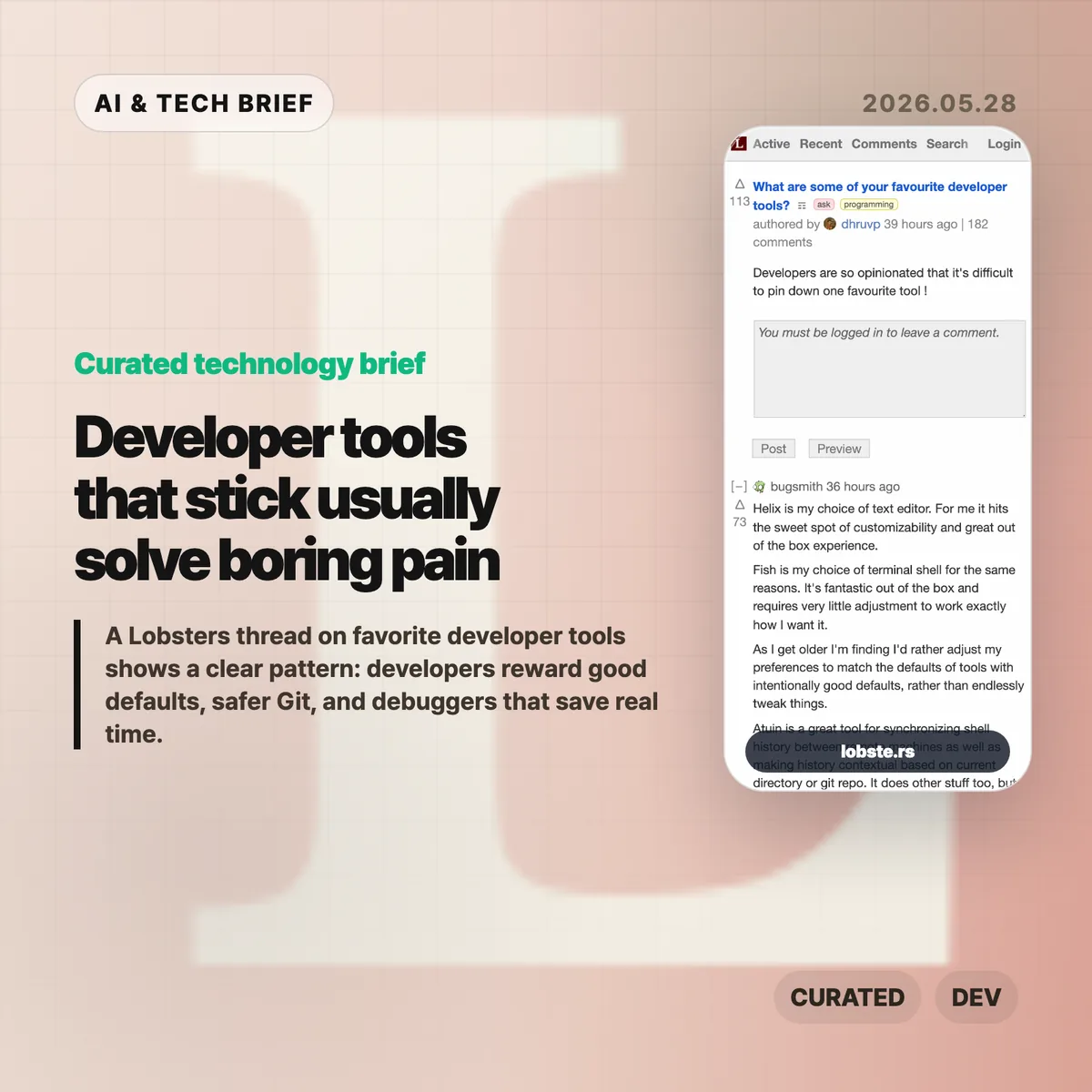
  • Developer tools that stick usually solve boring pain

    Developer tools that stick usually solve boring pain

    A long Lobsters thread about favorite developer tools turned into a useful map of what developers actually keep using. The names are scattered across editors, shells, Git front ends, environment managers, and debuggers, but the pattern is fairly consistent: good tools remove friction without demanding a new hobby.

    The short version

    • Editors did not converge on one winner. Helix, Emacs, Neovim, Sublime Text, Zed, and JetBrains IDEs all came up, usually with strong opinions about defaults and muscle memory.
    • Version control comments leaned toward tools that make risky Git work feel safer, including Jujutsu, Magit, lazygit, Sublime Merge, delta, and difftastic.
    • Shell and environment picks such as Fish, WezTerm, Ghostty, tmux, Nix, mise, atuin, and fzf show how much developers care about repeatable setup.
    • The most practical answers were often about debugging and profiling: rr, Pernosco, RenderDoc, Tracy, RemedyBG, and Xcode Instruments.

    Developer tools worth keeping

    The useful developer tools in this discussion share a boring promise: they make daily work safer, faster, or easier to repeat without turning setup into the main project.

    What happened

    A Lobsters user asked a simple question: what are some of your favorite developer tools? The thread drew more than a hundred comments, which is not surprising for a community that can turn editor choice into a personality test.

    The interesting part is that the answers were not only about shiny new tools. Many developers praised tools that feel good out of the box. Helix and Fish came up that way. Several commenters said they now prefer tools with intentional defaults because they have less patience for endless configuration. Others pushed back, arguing that a carefully tuned Emacs or Vim setup can pay off for years.

    That tension says more than any single ranked list would. Some developers want defaults they can trust. Some want a tool chest they can shape over a decade. Both camps are trying to protect the same thing: attention.

    Why this is worth watching

    The thread is a useful reminder that developer productivity is rarely one big leap. It is usually a pile of small reductions in annoyance.

    Version control is a good example. Jujutsu, usually called jj, appeared repeatedly because it changes how people approach rebases, amends, branches, and history editing. Magit, lazygit, Sublime Merge, delta, and difftastic serve a similar need from different angles. They make state visible. They make diffs easier to read. They make undo and review feel less like a trap.

    Environment management came up for the same reason. Nix has a steep learning curve, but the developers who like it are tired of one project breaking another. mise drew praise for language and tool version management without much ceremony. Dev Containers and chezmoi sit in the same problem space: a laptop, a work machine, a remote server, and CI should not all feel like separate archaeological sites.

    The best answers were not always the flashiest ones. rr came up because being able to record a failing C or C++ program and replay it deterministically can save hours on memory corruption bugs. Pernosco adds time travel debugging with data flow analysis. RenderDoc and Tracy matter to graphics and performance work. JetBrains users praised the IDE because its debugger and framework support keep them moving.

    What the discussion is missing

    There is no Hacker News thread attached to this story, and the Lobsters discussion is already the source material. That means the useful caution is not about missing crowd sentiment. It is about sampling.

    Lobsters skews toward developers who enjoy tools enough to discuss them in public. That naturally favors editors, shells, version control tools, language managers, and low level debugging workflows. Enterprise defaults, team policy, accessibility, onboarding cost, Windows-heavy shops, and non-English developer communities get less attention.

    The thread also underplays one awkward truth: a great individual tool can still be a poor team default. Nix may solve dependency drift for one group and become a support burden for another. Jujutsu may make history editing nicer for an experienced engineer while confusing someone who only needs basic Git. The right question is not “which tool won?” It is “which recurring failure does this remove from my day?”

    The practical read

    If you are reviewing your own toolchain, start with the moments that waste time rather than the tools that sound fashionable. Slow search points toward ripgrep, fzf, or a better code search workflow. Messy shell history points toward atuin or autojump-style navigation. Git anxiety points toward lazygit, Magit, jj, Sublime Merge, delta, or difftastic. Reproducible setup problems point toward mise, Nix, Dev Containers, or a smaller dotfiles system.

    For teams, the thread argues for better defaults rather than forced sameness. You do not need every developer in the same editor. You do need a project that starts in minutes, a version control workflow people can recover from, and debugging tools that make the worst bugs less mysterious.

    For more briefs on software teams, AI products, and developer workflows, see the IT & AI archive.

    The dull test is the right one: does the tool get you back to the problem faster?

    Sources

  • AI productivity claims are running ahead of the work

    AI productivity claims are running ahead of the work

    TechCrunch’s report on Aaron Levie’s warning about “AI psychosis” among CEOs lands because it names a familiar gap: executives see a strong demo, while teams still have to make the work correct, safe, and shippable. AI productivity claims can sound persuasive before that last-mile work is counted. The issue is not whether AI agents are useful. They are. The question is whether companies can tell the difference between a good prototype and a finished business process.

    The short version

    • Box CEO Aaron Levie argued that CEOs are especially vulnerable to overestimating AI because they sit far from the last mile of work.
    • Layoffs.fyi counted 115,430 tech layoffs across 152 companies in the first five months of 2026, close to the 124,636 total it tracked for all of 2025.
    • ClickUp CEO Zeb Evans said the company cut 22% of staff after deploying roughly 3,000 AI agents, a useful case study in how quickly the narrative is moving.
    • The hard part is measurement: more drafts, tickets, pull requests, or proposals do not automatically mean better output.
    • Hacker News readers mostly argued about two things: whether “psychosis” is a fair label, and whether executives understand the review work that AI creates.

    What happened

    The TechCrunch piece starts with Levie’s claim that CEOs are “uniquely prone to AI psychosis” because they are far enough away from frontline work to miss the remaining labor needed to turn AI output into value. That is the sharpest point in the article. A CEO can ask an agent to draft a contract, generate HTML, summarize a customer call, or produce a product mockup. Those outputs can look convincing in a meeting. They still need review, context, policy checks, security judgment, and someone willing to be accountable when the answer is wrong.

    The article also puts that argument next to a rough labor-market backdrop. Layoffs.fyi’s tracker shows 115,430 tech layoffs from 152 companies in the first five months of 2026. That does not prove AI caused the layoffs. It does show why the story is sensitive: AI is becoming part of the language companies use when they explain smaller teams, faster execution, and new operating models.

    ClickUp is the most concrete example in the report. CEO Zeb Evans said the company had deployed about 3,000 AI agents and reduced staff by 22%, while trying to build what he called a “100x org.” That framing is exactly why this debate matters for builders. If agents become part of the org chart, companies need a much better answer to a basic operating question: who reviews the agent’s work, and what happens when the agent is confidently wrong?

    Why this is worth watching for AI productivity claims

    The useful read is that AI adoption is moving faster than AI measurement. A team can count how many agent runs completed. It can count the number of documents, tickets, or pull requests generated. Those are activity metrics. They do not say much about whether the work reduced customer pain, lowered error rates, increased revenue per employee, or freed experts from low-value chores.

    That distinction matters because the research record is still mixed. California Management Review’s summary of AI productivity evidence warns against easy claims that AI adoption produces broad productivity gains by itself. An NBER paper on executives and AI productivity points to a gap between perceived gains and measured outcomes. MIT FutureTech’s labor-task research also suggests that many tasks remain harder to automate at human-level quality than the demo cycle implies.

    The management bottleneck may simply move. Harvard Business Review has made a similar point: if AI increases the volume of output, managers can become the constraint because more work needs to be read, compared, approved, or rejected. Anyone who has reviewed AI-generated code or AI-written legal text knows the pattern. The first draft arrives faster. The expensive part is deciding whether it can be trusted.

    For more briefs on AI products, software teams, and workplace automation, see the IT & AI archive.

    What Hacker News readers are arguing about

    The Hacker News thread around the TechCrunch article is active and messy in the usual useful way. A large part of the discussion focuses on the word “psychosis.” Some readers called it clickbait or a cheap use of medical language. Others defended it as a cultural shorthand for executives becoming detached from what AI can actually do. The split is worth noting because it mirrors the broader AI debate: people agree there is overconfidence, then fight over how harshly to name it.

    The more practical thread is about distance from the work. Several commenters argued that this is not new. Executives have long seen a toy example, assumed the hard part was solved, and pushed a rollout that frontline teams had to absorb. The AI-specific twist is that LLMs can flatter the user while producing a plausible artifact. A CEO who prompts a chatbot into a small front-end demo may come away feeling closer to engineering than they really are.

    There was also a strong operator objection: AI can create review debt. One commenter described a CEO who hit real walls around data architecture and deployment after experimenting with AI prototyping. That is the sane version of the story. The tool helped explore an idea, then exposed the need for human-designed infrastructure. Another repeated concern was failure rate. If a model gets 80% or 90% of text tasks right, the remaining errors can still be disastrous in legal, security, finance, support, or production engineering contexts.

    The thread is not evidence, but it is a useful sentiment check. Builders are not rejecting AI agents outright. They are rejecting the jump from “this generated something impressive” to “this can replace the people who know where the traps are.”

    The practical read

    Companies should treat AI productivity claims like product claims. Define the workflow, the baseline, the quality bar, and the failure mode before tying the result to headcount. If an agent writes support replies, measure refund errors, escalation rates, customer satisfaction, and policy violations. If it writes code, measure review time, defect rate, rollback frequency, and maintenance cost. If it drafts contracts, measure legal review burden and clause-level risk.

    For AI agent startups and workplace apps, the pitch also needs to mature. “We deployed 3,000 agents” is a flashy number, but buyers will eventually ask which agents survived contact with real work. The products that win will probably be the boring ones that make review easier, preserve audit trails, route uncertain cases to humans, and prove that cycle time improved without hiding risk.

    For workers, the signal is more personal. The safer skill is not prompt fluency by itself. It is judgment over the last 20%: checking the output, knowing the domain constraints, spotting the quiet mistake, and deciding when automation should stop.

    Sources